Category Archives: infosec

Link

Faking Your Death Online Is a Lot Harder Than It Used to Be by Roisin Kiberd via vice_motherboard_logo

“…But pseudocides are rarer in recent times. “Vanishing” oneself is more difficult; the world is simply too small a place now, connected as it is by social media and the surveillance it entails….”

“…Let’s say you are hiding in Japan, and a tourist takes a photo where you’re in the background,” he told me. “The photo is uploaded to social media and a week later, a cop uploads your photo into a facial recognition site like TinEye [a reverse-image search engine]. Boom—you’re busted, because TinEye will find your photo online…”

Link

Tor Users Might Soon Have a Way to Avoid Those Annoying CAPTCHAs by Joshua Kopstein via vice_motherboard_logo

“…a new repository on CloudFlare’s Github page shows that the company is developing an alternative method for anonymous users to access sites without having to repeatedly solve annoying CAPTCHA puzzles—something privacy advocates will likely see as a step in the right direction….”

“In essence, the protocol allows a user to solve a single CAPTCHA and in return learn a specified number of tokens that are blindly signed that can be used for redemption instead of witnessing CAPTCHA challenges in the future,”


Link

Your Smartphone Is Becoming An AI Supercomputer by Sean Captain via fastco-e911a1ecaff695c740670e41df436c86

“…Just as “the cloud” was becoming the answer to every “How does it work?” question, smartphones have started clawing back their independence, performing on their own tasks that used to require a tether to a server farm. The result is a more natural AI experience, without the annoying or creepy lag of an internet connection to a data center…

…AI will also drive convenience features. You might see virtual assistants that use the phone’s camera to recognize where you are, such as a specific street or the inside of a restaurant, and bring up relevant apps, says Rizzoli. And for once, such hyper-conveniences may not have the creep factor. If future AI doesn’t need the cloud, then the cloud doesn’t need your personal data…

…As artificial intelligence continues expanding across the tech world, it seems destined to grow on phones, too. Expectations are rising that gadgets will simply know what we want and what we mean…”

Link

Best Books on the Impact of Technology on Society by Narain Jashanmal, via medium.com 

…As technology moves from the realm of the visible to the invisible; embedded, pervasive computing that adds intelligence to even the most mundane objects and experiences — there will be an inevitable, ongoing conversation about the consequences, unintended or otherwise… The books on this list run the gamut, from unabashed enthusiasm for our coming robot overlords, to heartfelt expressions of anxiety about whether what we’re giving up is worth what we’re getting in return…”

Test your VPN through Terminal – Linux Tips

computer-VPN

Do you use a VPN to connect to Internet and increase your privacy? If you are one of the many you would be sure that the VPN you are paying is really working properly.

You can always use, via browser, one of those dedicated websites that check your Ip and, in some cases, test the real effectiveness of VPN and/or use Terminal.

But, for my experience, if you prefer to test your public IP without using the Terminal, the best tutorial for this specific task has been published by http://www.tecadmin.net.

Get Public IP using Linux Terminal

Recommended!… if you are looking for an extra test that you can manage directly from Terminal.

Bot Assistants Around Us – A Practical Case

abstract-1278061_640Pupils in an electronic learning course at the Georgia Institute of Technology were amazed to discover that the teaching helper they corresponded with all session ended up to be a robot.

Called Jill Watson, the auto attendant talked with students about homework, course projects, and answered questions about the course, the Wall Street Journal reports.

Jill Watson is part of Georgia Tech’s on-line learning programs offering university grade courses to thousands of pupils via Udacity. According to the Georgia Institute of Technology, their bot gets up  10, 000 messages each semester, which is simple for people to get bogged down or be able to respond to all the questions.

Today, Watson powered technology is used also by a bevy of companies. The machine understanding and statistics technology had been trained to know perfect recipes, answer economic concerns, conduct client support in Spanish and power a goalkeeper robot at a popular resort chain.

Whilst the interaction isn’t completely streamlined however, people are now able to speak with bot assistants rather than humans via Facebook chats.

But the particular bot at the Georgia Institute of Technology is not like bots you may find in Facebook, it is able of more developed interactions.

Last but not least you have to consider that having a bot privately maintaining TA responsibilities through a semester might be seen as an ethical difficulty, but for this particular course it is sensible and appropiate.

Link

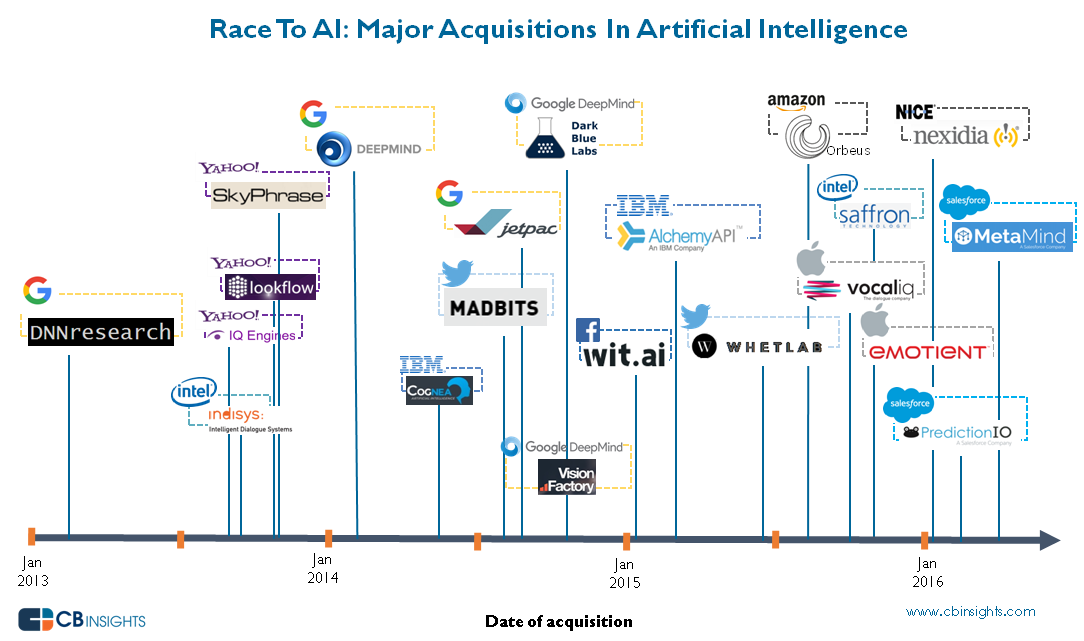
The Race For AI: Google, Facebook, Amazon, Apple In A Rush To Grab Artificial Intelligence Startups by CB Insight

ai_acqui_timeline_2016april

Over 60% of the AI companies acquired in the last 3 years had VC backing. There have been 4 major acquisitions already in 2016.


How Australia can cash in on the cyber boom

By  via ZDNet

LINK TO THE ORIGINAL ZDNet POST

…”Australia is a world leader in developing infosec ideas, but bad at commercialising them. There’s a plan to fix that”.

sh_cyber-wall-street_750

“We’ve got to create a cyber industry, create depth in the talent pool, to be able to support our other industries as well … We need to get a critical mass of researchers to attract the investment.”…

LINK TO THE ORIGINAL ZDNet POST

3 steps to install DNScrypt to improve your privacy – Ubuntu version

Also if you use OpenDNS to improve your standard of privacy, you are not protected by “last mile” dangers but you can boost your security installing DNScrypt on your digital device. DNScrypt “works by encrypting all DNS traffic between the user and OpenDNS, preventing any spying, spoofing or man-in-the-middle attacks”.

DNScrypt “is a protocol that authenticates communications between a DNS client and a DNS resolver” and it “is not a replacement for a VPN, as it only authenticates DNS traffic, and doesn’t prevent “DNS leaks”, or third-party DNS resolvers from logging your activity”.

For this reason you have to be conscious that DNScrpt is just a -very good- improvement of your privacy but not the definitive solution to all your privacy concerns.

DNScrypt is so versatile that you can install it on every kind of device you prefer. In fact it is possible to download DNScrypt for servers, IOS, OSX, Android, Windows and Linux computers (DNScrypt-proxy version). Obviously the installation and setup will vary a little depending the OS you installed on your device.

Concept-Skyscraper-Feeds-on-Air-Pollution-Uses-It-to-Grow-433607-2

Image from softpedia.com

Here we are talking about DNScrypt installation on Ubuntu.

For this purpose I suggest to use the Terminal that allows you to install DNScrypt i just 3 steps:

sudo add-apt-repository ppa:anton+/dnscrypt
sudo apt-get update
sudo apt-get install dnscrypt-proxy

Last but not least, you need to interface the Internet traffic of your computer through the DNScrypt-proxy. For this reason you have to Edit your Network Configuration and add the address 127.0.0.2 to the “DNS Servers” line as for the below screenshot:
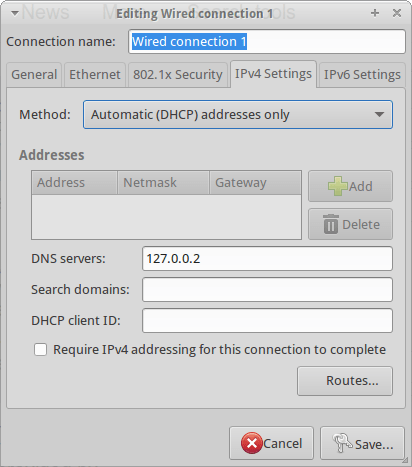
DNSCrypt

Now you can start DNScrypt just typing:

sudo dnscrypt-proxy -R opendns -a 127.0.0.2:53 -u okturtles

Where, in my specific case, okturtles is the name of the remote DNS resolver I decided to use. I chose that specific risolver from the list I found into into my computer after DNScrypt-proxy installation:

/usr/share/dnscrypt-proxy/dnscrypt-resolvers.csv

As usual in similar situations, you may want to spend another couple of minutes to configure your computer to start DNScrypt at the computer boot. Open the Session and Startup manager through the desktop Dash and Add this specific command to the Application Autostart menu:

sudo dnscrypt-proxy -R opendns -a 127.0.0.2:53 -u dnscrypt