In our personal opinion gOS could be the -OS + hardware solution- for everyone. In fact we do not think useful to distinguish tech developed countries for the personal income of their citizens. Everyday we do meet many people with big problems in using pcs and internet also in the most developed countries so why do not spread new technologies using a simplified (we mean simpler to use, not a less featured Linux) OS which can run using cheap hardware? gOS could be one of the possible solution. This week in our Linux Page (in Spanish) we have posted a detailed review about this new (not so new because it has been built on Ubuntu) OS and we also give some technical information about transforming your Ubuntu in gOS (Beware! We were not able to downgrade to Ubuntu so, if you are not an expert, consider as definitive your Ubuntu changes to gOS!!) gOS is clean, easily (and immediately) usable OS with many intuitive icons which simplify the way of using your pc. gOS integrates many Google online services as Mail, Docs, Calendar, Maps, Docs, Products, News and other Web 2.0 websites as Meebo, YouTube, Blogger, Wikipedia, etc.. In few words this OS hasn’t any new “revolutionary” feature but uses -at their best- many Web 2.0 websites. Highly recommended (and not only to the youngest and the elders)!

Category Archives: Ubuntu
Krusader 1.80.0: an advanced advanced twin panel file manager for KDE!
This week, in our Linux Page (in Spanish) we have posted a brief but complete review about Krusader: one of the best file manager for KDE. As we all know, in the next Ubuntu 7.10 we will find the new Dolphin beyond to the traditional Konqueror (the KDE file manager and universal viewer) but we would like to prefer to keep your attention on this twin panel file manager. The complete list of Krusader’s features is so long that we prefer to underline just the main ones. In fact, two of the most interesting features are the remote connection manager and the special function for synchronizing directories which are very simple to use. Moreover the possibility of creating a customized menu gets Krusader very user friendly. Recommended! 
Gnome Sensors Applet (GSA): a -must have- applet for your hardware security in Gnome OS!
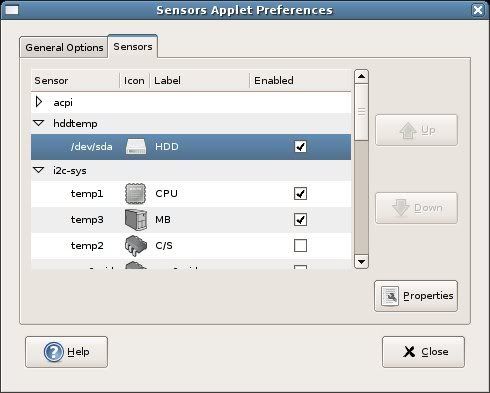
Today, in our Linux Page (in Spanish) we strongly suggest a very useful applet for every Gnome OS: GSA. The Gnome Sensors Applet let you constantly check the hardware sensors, including CPU temperature, fan speeds and voltage. GSA is very easy to install and manage; its intuitive graphical interface allow you to decide what alarms you prefer to display in case of emergency. GSA is recommended for all the Linux users who constantly push the limits of their pc. 
Wubi: one of the best Ubuntu installers for Windows users.
Today, in our Linux page we have posted a brief review about Wubi: a simple and effective Ubuntu installer for Windows users. With just few clicks you can easily install Ubuntu without modifying the partitions on your pc (for this reason there are no -or very low- risks of “fatal errors” for your computer). All the Ubuntu files are stored in just a single folder so it is very simple to uninstall Ubuntu if you decide not to use it anymore. In few words, Wubi allows Linux beginners to try all the positive features of Ubuntu without risking undesirable secondary effects. Recommended! 
How to keep your Ubuntu efficient: cache cleaner, orphan remover and programs eraser.
To obtain best results with your pc, it is important to regularly maintain the efficiency of the OS (Ubuntu in our tests). Unfortunately, we were not able to find a specific program which could manage all the necessary tasks but we discovered some useful command lines to be used in your konsole. For this reason, today, in our Linux Page (in Spanish), we have posted a brief but complete manual about erasing cache, orphan links-software and unnecessary programs in Ubuntu. To keep your Ubuntu always fast and efficient we believe that you should use the described command lines at least once a month. Enjoy it! 
Security package for Ubuntu: antivirus, firewall and P2P stealth
Linux is the safer OS you can use today: specific Linux viruses are few and malware is rare but with the increasing of users some threads are becoming real. For this reason, I strongly believe that nowadays a simple firewall is not enough we all need also a good antivirus. Today, in our Linux Page we’ve posted a short manual where we explain how to install a firewall (Firestarter), an antivirus (Avast) and a P2P stealth (Peer Guardian). We have tested all this software on a Ubuntu 7.04 without relevant problems; the combined use of this triplet is strongly recommended for people who desire to preserve their data and privacy. 
BUM (Boot-UP Manager): the boot configuration utility for Ubuntu
Today, in our Linux page we post a review about BUM a powerful, graphic Boot-up Manager for Ubuntu. Using this light software you can modify and decide what programs run at startup. BUM is a very useful tool, precious especially when you notice that your Ubuntu boot is becoming slower than in the past. Initializing the Boot-up Manager is very simple and fast: recommended for the Linux beginners (like us)! 
How to solve upgrade problems in Ubuntu: some brief notes.
Yesterday a new version of Ubuntu (Feisty Fawn 7.04) has been released. This new version seems to be more powerful and enjoyable than the 6.10 and we hope it will actively contribute to spread the use of Linux. For people using Ubuntu 6.10, Ubuntu released simple and brief instructions to upgrade fast the OS.
In our Linux Page, we posted a brief tutorial about solving problems generated by an Ubuntu upgrade (this kind of problems is not common but unfortunately sometimes it happens..). The post, inspired some Italian blogs we found on the web, is very simple and effective and we hope it could be useful… in case of emergency. See you soon!
Psubuntu: how to install Ubuntu on the new PS3
Last week we posted a review on installing different Linux versions in the new PS3. Today, in our Linux Page (in Spanish) Frank wrote a brief but complete review on Psubuntu, the perfect way to install Ubuntu (or Kubuntu if you prefer) on your PS3. The Psubuntu blog is full of information and tips not only for people who want to learn how to use Ubuntu on the PS3. The “manuals” hosted are complex but well written and easy to understand also for people like me who is just a beginner. Last but not least, don’t forget that installing Linux on PS3 increases the number of multimedia formats you can enjoy on it! 
Ubuntu Migration Assistant (UMA) in the new Ubuntu 7.04 Feisty Fawn (Beta)
The new 7.04 beta version of Ubuntu was recently released. In few weeks (or less) we will enjoy the new final version which seems to have some new interesting features. The Ubuntu Feisty Fawn version has a new codec wizard to install codecs, a powerful plug and play network sharing function which will be very useful for the evolute home networks where multimedia files are shared in shared external hard disks. In our Linux Page we posted a brief note about the new UbuntuUMA) Migration Assistant (which allows you to import Internet Explorer bookmarks, Firefox favourites, desktop wallpaper, AOL IM contacts, and Yahoo IM contacts directly from your installed Windows OS. I am sure that, in the near future, UMA will be one of the most interesting Ubuntu features for people who want to run a dual-boot system.