Tag Archives: Tecnologia

Link

How Monocle found money in radio

monocle-announces-a-24-hour-radio-program

Courtesy of psfk.com

While many print publications are ramping up their podcast output, Monocle magazine went beyond and launched its own 24-hour digital radio station in 2011. It now has 1 million monthly listeners, double what it had last year, according to internal figures…

…Monocle 24 is ad-funded and is financially viable, but Bloomfield wouldn’t go into specifics. Brands, such as UBS, Turkish Airlines, Air Canada and Allianz pay to sponsor the shows, but have no editorial control. “Being more integrated is definitely to a brand’s benefit,” said Emma Moorhead, head of AV planning at media agency MEC. “Most podcasts have small audiences, but then, of course, they can be really targeted, although you can’t get that kind of scale…

How Monocle found money in radio


Defend Trade Secrets Act. It’s Coming: What You Need to Know — The National Law Forum

The Defend Trade Secrets Act (DTSA) is headed to President Barack Obama for his signature, and there is little doubt that President Obama will sign it into law. Below is a summary of what you need to know about this soon-to-be law, including what you should be talking to your employment law counsel about in […]

via Defend Trade Secrets Act. It’s Coming: What You Need to Know — The National Law Forum

Can audio go viral on Facebook? Here’s what happened when NPR ran an experiment for a month by Serri Graslie via NiemanLab

“Trust me, this is really, really great even though you don’t know who’s talking and there’s nothing to look at and I’m asking you to focus for 40 seconds!”

Link

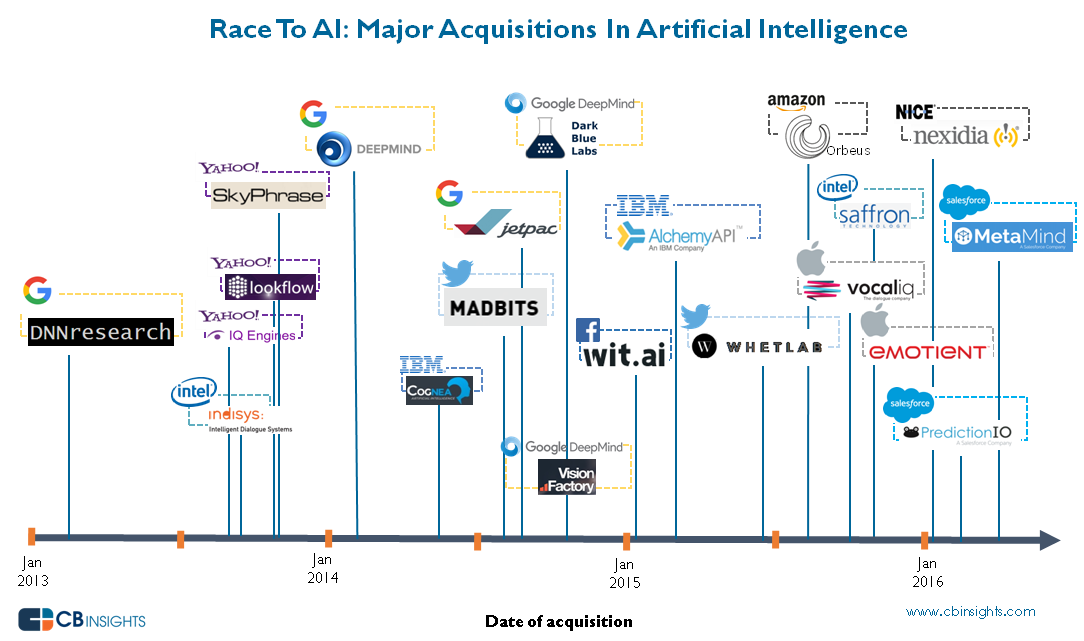
The Race For AI: Google, Facebook, Amazon, Apple In A Rush To Grab Artificial Intelligence Startups by CB Insight

ai_acqui_timeline_2016april

Over 60% of the AI companies acquired in the last 3 years had VC backing. There have been 4 major acquisitions already in 2016.


How Australia can cash in on the cyber boom

By  via ZDNet

LINK TO THE ORIGINAL ZDNet POST

…”Australia is a world leader in developing infosec ideas, but bad at commercialising them. There’s a plan to fix that”.

sh_cyber-wall-street_750

“We’ve got to create a cyber industry, create depth in the talent pool, to be able to support our other industries as well … We need to get a critical mass of researchers to attract the investment.”…

LINK TO THE ORIGINAL ZDNet POST

HTML5 Privacy Matters: DOM Storage. How to solve it in only 2 steps!

Recently I started an online course that was created using the Google Course Builder.

After I registered the course I was not able to access it because “my browser didn’t allow the web storage” and, for this reason, a message informed me that it would be necessary to use a up-to-date browser as Chrome or Firefox.

The only problem is that I always use Firefox. Obviously a “particular” version of Firefox where I also added a bunch of different add-ons to enhance the privacy protection level of my navigation and, for this reason, the Google course was not available for me.

Normally I would have decided to quit the course because I prefer not to modify my Firefox configuration after I spent so much time searching the best add-ons to preserve a minimum of privacy.  But, in this case, I really wanted to attend the course and so I decided to manually operate on the Firefox configuration to “solve” the problem and allow Google to keep all the information it would have considered as essential.

This is the list of what I did:

– open Firefox and type:

about:config

in the address bar.

– search for:

dom.storage.enabled

and change its configuration from “false” to “true” double-clicking on it.

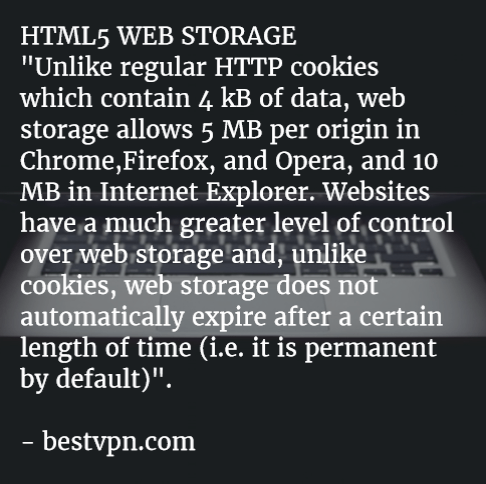
After this fast change in the Firefox’s configuration menu I was able to attend the Google course but….. I am conscious that my privacy is a little bit less protected because now Google can store up to 5 MB of content on my browser. In fact, before HTML 5 we were used to “cookies” and we were able to “manage” (better: erase) them also if, as the LSO Flash cookies, they were more persistent than usual. Moreover in the old html times, the space available for cookies on your local browser was 4 KB (yes… KB) but now, in the Html 5 era, a single website can easily manage and permanently store till 5 MB on your browser. And this is the reason why I decided to protect my privacy disabling the DOM Storage on Firefox and this is also the reason because I will disable DOM Storage as soon as I complete the Google course…
DOM STORAGE
If you are not a simple user but you prefer to directly and consciously operate on the Firefox configuration to improve your privacy level, you would read this interesting post by BestVPN.
————-

References:

3 Good Reasons to persist in using Google ncr = no country redirect

why_istock_000007228941xsmall-300x198

Image from: marketing-partners.com

Since some weeks ago, I used:

http://google.com/ncr

for my web search and I was able to open the main Google Homepage without to be redirected to any local Goole site.

What I usually obtained was:

1 – less “personalized” search results: the algorithm will be not “contaminated” by my local IP and I will able to find information “cleaned” by local trends;

2 – the possibility to use the “same” Google even when I am abroad;

3 – the security that my searches were always up-to-date respect the global actual trends. For my experience when I search some particular topics as “marketing” I obtain, in the first Google page, fresh news only using Google in its NCR version. If I try to use my local Google homepage I have to spend more time setting the Google’s “advanced search” or trying to understand what information are “really” fresh new.

url-720x340

Image from: mods2015.com

I found the right solution when I visited ycombinator.com and I found the post created by newman314 that submitted a link that combined NCR and SSL protocol (for a little bit of more privacy).

https://encrypted.google.com/search?q=test&qscrl=1&n…

https://encrypted.google.com/search?q=test&qscrl=1&ncr=1

Where the word “test” is what I am looking for.

Then I also found a faster solution by dragop:

http://www.google.com/?gfe_rd=cr&gws_rd=cr

and, in the same webpage, a shorter version from 3dfan:

http://www.google.com/?gws_rd=cr

On my side I prefer to use this other URL that gives me the same results through an SSL connection:

https://encrypted.google.com

To be sure that the results were really the same and not simply related with the English language and influenced by the IP, I tested this URL comparing them from what I obtained from the above mentioned:

http://www.google.com/?gws_rd=cr

I discovered that what I “received” using encrypted.google.com are really the same links and they are not just the standard local results in the English language.

I know that cookies will not allow me to have real “septic” results but this is the first step to a less passive use of Google search because I would like to be a more active user and not just a passive customer pampered by Google.


Start 2016 with a bunch of unusual Linux OS!

linux-distributions-to-look-forward-in-2016

What’s better than testing? For me nothing!

For this reason, let me introduce some “unusual” Linux distribution proposed by Jesse Afolabi @Jesseflb via Techmint.

VeltOS and PapyrOS are based on Arch but the last one is in its pre-alpha testing so it’s not suggested for beginners.

Moreover, we may decide to begin 2016 with Korora that is still one of my favorite projects also after so many years since the first release.

Last but not least, we have Solus OS 2 that it is not the most Linux distribution I tested but it is stable and really well built.

Happy 2016!

Link
star-wars-logo

Image from opencastingcall2013.com

What Do Star Wars and Recent Data Breaches Teach Us About Cyber Ethics?

Could Privacy Law Limitations kill the Internet Dream?

Is Privacy a fundamental human right? Your personal answer to this question is the starting point to think about the current Internet legislation and to evaluate if the recent legal restrictions on civil rights could represent the “end of the Internet Dream.” A clear and motivated opinion about this issue is a strategic keypoint for all those people who, as me, operate everyday in one of the many Internet branches as consultants, lawyers, programmers, marketing experts, investors or, more often, as common users.

Dan Gillmor, via BACKCHANNEL, has recently underlined that a liberal legislation should not restrict end to end encryption, because it represents the best safeguards for tomorrow’s freedom. A standard use of fragile encryption, imposed by Law, will not only interfere with privacy, but will also heavily tamper with Internet global security.

o-INTERNET-PRIVACY-facebook

Image by quotesgram.com

On the other hand, Dan Patterson, via TECHREPUBLIC, has reported two different conversations with UN reporters who affirmed that strong encryption allows privacy and privacy is the corner stone of truth, especially for reporters, because it helps to “validate the veracity of information.”

Consequently, to preserve our privacy in our daily living it would be useful to:

  • Use Privilege VPN or  HTTPS connections when you surf Internet;
  • Use Encrypted Storage for your data, especially if you cannot avoid using cloud-based services;
  • Watch the Legislator: contact the MP/Politician who represents you and express your point of view, each time a restrictive Law proposal is under discussion.

As Citizens, the real challenge we have for the next months is represented by the influence we will be able to exercise on new Laws that should find a legal equilibrium between anti-terrorism surveillance and the need of protecting citizen’s personal information allowing the use of VPN/HTTPS connections and Encrypted Storage.