This week in our Freeware Page we have posted some short instructions about installing “Remember the milk” in Google Calendar. It is important to say that “Remember the Milk” can also be installed on Gmail, Iphone/Ipod Touch, Twitter and there is also a “Milk Sync” version for Windows Mobile. In my opinion, the best feature is represented by the integrated to-do list for Google Calendar. Anyway, “Remember the Milk”, is easy to manage and very simple to use and share with your team. Moreover, this particular task manager contains many interesting and useful features; just for example you can add an active link to a web-page directly in your to-do note. If you prefer, you can also organize your tasks in a -tag cloud- style. Last but not least, it is possible to receive reminders via email, SMS, and instant messenger (AIM, Gadu-Gadu, Google Talk, ICQ, Jabber, MSN, Skype and Yahoo! are supported). As you can imagine, “Remember the Milk” portability is very wide and it has 100% passed all our tests; in few words: we have not found any bugs! Recommended!

Category Archives: Free Software Magazine
FEBE and CLEO the best solution to save (and reinstall) your Firefox settings: extensions, themes and bookmarks!

Today, in our Freeware Page (traditionally in English) we have added an effective post (in Spanish) about FEBE and CLEO: two fantastic Firefox extensions which allow you to backup all your personal Firefox settings. FEBE is a multiplatform add-on (Linux, Windows, and OS X) easy to install and to manage. In fact, the “FEBE Options” is a complete menu where it is possible to choose: what to save, where (destination folders) and frequency of the backups. Personally, I do suggest to change the default options and not to backup your usernames, passwords and cookies using FEBE. In fact, the backup file, a .xpi, could be stolen and easily reinstalled on a third part computer. Last but not least I want to underline the key role of CLEO which allows FEBE to create the installable .xpi file with all your settings. Recommended!

How to create free tutorials and presentations: the multiplatform Wink

Sage = how Firefox let you to easily read all the web feeds you prefer!
This week, in our Freeware Page, we have posted a brief review about one of the most interesting Firefox add-on we have found in the Mozilla website: Sage. This particular add-on allows you to easily read and manage all your favorite web feeds directly using Firefox. Sage contains also a feed discover who allows you to find RSS simply typing a keyword, moreover it is possible to import and export your web feeds through the OPML format. The graphics is very enjoyable and complete and after few minutes you forget the RSS reader you have used till now. Something to try!

Pingdom Tools: a couple of “must have” online tools for blogger and webmasters!
Today, in our Linux Page (in Spanish) we have posted a recension about Pindom Tools: two useful (and free) on-line tools which can be very useful for blogger and webmaster. Using Pingdom Tools you can have a fast report about the loading time of your web-pages. The Pingdom report is very easy to understand, with just one glance you are able to better understand the hierarchy and the load order of the graphic objects in your blog/site. Using Pingdom tools you can dramatically improve the time for loading your site and change all the objects, scripts, images or plugins which slow your sites. Last but not least, Pingdom offers an accurate ping and trouceroute service to better understand your network response time and track down possible errors.

Comodo backup for Windows XP: the freeware you need to have!
Today, in our Freeware Page we add a review on one of the free softwares offered by Comodo. Comodo backup is very simple to use but effective freeware which allows you to easily store sensitive data on a external Hard Disk or on a multisession DVD. If you prefer you can also use the ftp feature. The graphic interface is essential but clean and in just few clicks you are able to start store files and/or folders. Last but not least if some troubles happen to the hard disk you can restore them directly from your pc with one click. Free, Easy and Fast! 
HTTrack: a very useful multiplatform (Windows, Linux and OS X) website copier!
This week we have reviewed a useful multiplatform (Windows, Linux and OS X) software dedicated to all the people who desire read their favorite web-sites also when disconnected from the web. HTTrack is a very powerful program which contains easy (not always unfortunately) features to download complete websites and navigate them when outline. In our Freeware Page you can find a brief but incisive review about this program. Moreover for the Linux geeks, we inserted some tips (how to install and useful links) about HTTrack in our Linux Page. Sometimes the use of HTTrack could be a little difficult but after some experiments you will be able to manage it without problems. Enjoy it! 
How to extract archives (ACE, ARJ, CAB, CHM, CPIO, DEB, ISO, JAR, LZH, NSIS, OOo, PAK/PK3/PK4, PET/PUP, RAR, RPM, SLP, Z/TZ) and create many others in just few clicks: PeaZip!
Today, in our Linux Page (in Spanish) we have post a review about PeaZip: a terrific program which is able to solve many common problems when extracting certain types of archives such as ACE, ARJ, CAB, CHM, CPIO, ISO, Java archives (JAR, EAR, WAR), Linux installers (DEB, PET/PUP, RPM, SLP), LHA, LZH, Open Office file types, PAK/PK3/PK4, RAR, Windows installers (NSIS, some MSI), Z/TZ. This program was developed in two different versions: for Windows (XP and Vista) and for Linux. Moreover a powerful portable/standalone version (for both Windows and Linux) is available. Last but not least, using PeaZip you will be also able to create 7Z, 7Z-sfx, BZip2, GZip/TGZ, PAQ8F, PAQ8JD, PAQ8L, PEA, QUAD, split (.001), TAR, ZIP archives. In few words, PeaZip is tiny, extremely useful and easy to use program: strongly recommended! 
SpaceTime: powerful 3D browsing for Windows 2000/XP/Vista!
Today in our Freeware Page, we posted a review (in Spanish) about SpaceTime: a brand new 3D tabbed “browser” which runs using the Internet Explorer 7 engine. SpaceTime has a powerful graphics and is very attractive to use but, unfortunately it needs a good hardware to run without problems: 512MB RAM, 128MD graphics adapter (3D capable), Pentium 4 2.4GHz or AMD 2400xp+, a minimum screen resolution of 1280 x 1024 and an ADSL connection to Internet. SpaceTime is in its beta version but during the tests we didn’t find any bugs. Moreover we were fascinated by its multiple features; in fact it is also possible to search (Google, Google Images, Yahoo!, Yahoo! Images, Flickr) and shop (ebay) in an delightful 3D environment. At the moment SpaceTime is available for Windows 2000, XP and Vista but “the Mac version is coming soon”. In our opinion SpaceTime is an interesting free consumer PC software application which represents the state of the art for contemporary 3D technology. 
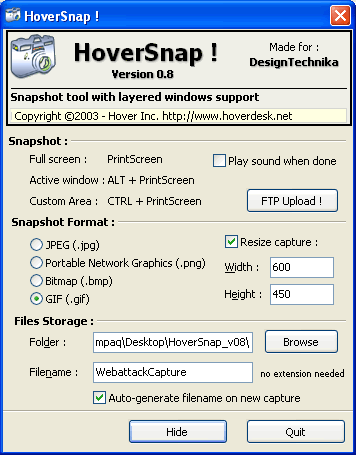
Hoversnap: perhaps the best portable freeware for professional snapshot tool.
Hi you all and sorry for a so long silence. Today, in our freeware page we posted a review about Hoversnap, a portable terrific snapshot tool for Windows. This freeware is very light – just 395 Kb- but very powerful! Try it and you will be delighted by this freeware!
We promised you a special gift for the Christmas period and we really are almost ready (sorry for the delay, I think we will be ready in more or less 10 days..). The gift is a collection of portable software which can be used on a 1 GB USB pen. This collection (for Windows) is thought to be very useful and simple to use, you have to just download it and copy on your USB key. See you soon!