Category Archives: Technology News

How to extract archives (ACE, ARJ, CAB, CHM, CPIO, DEB, ISO, JAR, LZH, NSIS, OOo, PAK/PK3/PK4, PET/PUP, RAR, RPM, SLP, Z/TZ) and create many others in just few clicks: PeaZip!

PeaZip LogoToday, in our Linux Page (in Spanish) we have post a review about PeaZip: a terrific program which is able to solve many common problems when extracting certain types of archives such as ACE, ARJ, CAB, CHM, CPIO, ISO, Java archives (JAR, EAR, WAR), Linux installers (DEB, PET/PUP, RPM, SLP), LHA, LZH, Open Office file types, PAK/PK3/PK4, RAR, Windows installers (NSIS, some MSI), Z/TZ. This program was developed in two different versions: for Windows (XP and Vista) and for Linux. Moreover a powerful portable/standalone version (for both Windows and Linux) is available. Last but not least, using PeaZip you will be also able to create 7Z, 7Z-sfx, BZip2, GZip/TGZ, PAQ8F, PAQ8JD, PAQ8L, PEA, QUAD, split (.001), TAR, ZIP archives. In few words, PeaZip is tiny, extremely useful and easy to use program: strongly recommended! AddThis

How to upgrade or repair your Macintosh or Ipod: a quick reference guide to useful websites!

AppleToday, in our Freeware Page we have added a new (and very detailed) post with useful links to websites containing terrific instructions to upgrade or repair Ipod, Apple desktops and laptops. These websites can be useful for the people (like us) who do not desire to throw away their Macintosh only because a new model has been launched. Last but not least we have decided to insert also some links to websites which have Macintosh news and guides about regenerating old notebook batteries. If you have some more useful and free websites to suggest, please, write a comment! AddThis

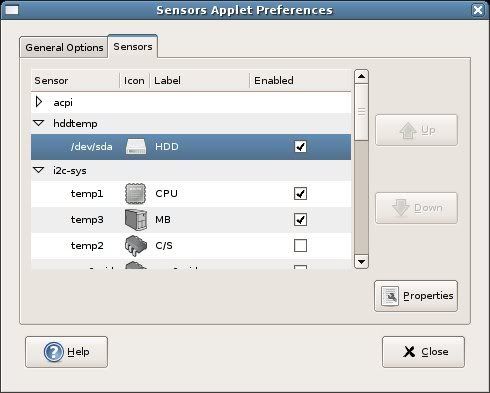
Gnome Sensors Applet (GSA): a -must have- applet for your hardware security in Gnome OS!

Gnome Sensors AppletToday, in our Linux Page (in Spanish) we strongly suggest a very useful applet for every Gnome OS: GSA. The Gnome Sensors Applet let you constantly check the hardware sensors, including CPU temperature, fan speeds and voltage. GSA is very easy to install and manage; its intuitive graphical interface allow you to decide what alarms you prefer to display in case of emergency. GSA is recommended for all the Linux users who constantly push the limits of their pc. AddThis

SpaceTime: powerful 3D browsing for Windows 2000/XP/Vista!

SpaceTimeToday in our Freeware Page, we posted a review (in Spanish) about SpaceTime: a brand new 3D tabbed “browser” which runs using the Internet Explorer 7 engine. SpaceTime has a powerful graphics and is very attractive to use but, unfortunately it needs a good hardware to run without problems: 512MB RAM, 128MD graphics adapter (3D capable), Pentium 4 2.4GHz or AMD 2400xp+, a minimum screen resolution of 1280 x 1024 and an ADSL connection to Internet. SpaceTime is in its beta version but during the tests we didn’t find any bugs. Moreover we were fascinated by its multiple features; in fact it is also possible to search (Google, Google Images, Yahoo!, Yahoo! Images, Flickr) and shop (ebay) in an delightful 3D environment. At the moment SpaceTime is available for Windows 2000, XP and Vista but “the Mac version is coming soon”. In our opinion SpaceTime is an interesting free consumer PC software application which represents the state of the art for contemporary 3D technology. AddThis

Two interesting sites for IT news and a nice proposal to personalize your desktop: Perfect Fantasy

Perfect FantasyPerfect Fantasy is a nice, well shaped collection of blue and/or pink icon. This collection is very attractive and contains 62 icons in three different formats (PNG, ICO and ICNS). From the website it is possible to download also two wallpapers (blue and pink) for a perfect customization of your desktop. Last but not least, today, in our hi tech news and tips Page, we posted new links about two very interesting websites. AddThis

Wubi: one of the best Ubuntu installers for Windows users.

Wubi HomepageToday, in our Linux page we have posted a brief review about Wubi: a simple and effective Ubuntu installer for Windows users. With just few clicks you can easily install Ubuntu without modifying the partitions on your pc (for this reason there are no -or very low- risks of “fatal errors” for your computer). All the Ubuntu files are stored in just a single folder so it is very simple to uninstall Ubuntu if you decide not to use it anymore. In few words, Wubi allows Linux beginners to try all the positive features of Ubuntu without risking undesirable secondary effects. Recommended! AddThis

How to keep your Ubuntu efficient: cache cleaner, orphan remover and programs eraser.

Linux PageTo obtain best results with your pc, it is important to regularly maintain the efficiency of the OS (Ubuntu in our tests). Unfortunately, we were not able to find a specific program which could manage all the necessary tasks but we discovered some useful command lines to be used in your konsole. For this reason, today, in our Linux Page (in Spanish), we have posted a brief but complete manual about erasing cache, orphan links-software and unnecessary programs in Ubuntu. To keep your Ubuntu always fast and efficient we believe that you should use the described command lines at least once a month. Enjoy it! AddThis

How to install KDE 3.5.7 in Kubuntu: a quick way!

KDEThis week in our Linux Page (in Spanish) we have posted some quick and easy notes about installing the new KDE version: 3.5.7. This new KDE version solves some bugs of the previous releases and adds new features to KPDF, Umbrello, KDevelop. The installation of KDE 3.5.7 is easy and takes not more than 15-20 minutes (it depends on how smart you are in Linux). This KDE upgrade is strongly recommended to keep your Kubuntu safer and 100% efficient while waiting the new KDE 4. AddThis

Security package for Ubuntu: antivirus, firewall and P2P stealth

Link to Linux Page Linux is the safer OS you can use today: specific Linux viruses are few and malware is rare but with the increasing of users some threads are becoming real. For this reason, I strongly believe that nowadays a simple firewall is not enough we all need also a good antivirus. Today, in our Linux Page we’ve posted a short manual where we explain how to install a firewall (Firestarter), an antivirus (Avast) and a P2P stealth (Peer Guardian). We have tested all this software on a Ubuntu 7.04 without relevant problems; the combined use of this triplet is strongly recommended for people who desire to preserve their data and privacy. AddThis

How to add a cool “MAC OS X” dock in your Linux: two different solutions for Kubuntu.

KoolDockLinux is Linux but the MAC OS X dock has always fascinated us. For this reason, in our Linux Page, we posted few notes explaining how to insert a “MAC OS X” dock in the Linux desktops. In the recent past there were some bugs in using these docks but now these two solutions – KSmoothDock and KoolDock – seem to be more stable and fast also in Linux. In particular we tested the three docks and we didn’t find any problem. Last but not least, between the best docks for Linux, we cannot forget to mention an “evergreen” like Superkaramba and its nice Tuxbar. AddThis