This week, in our Linux Page (in Spanish) we have posted a quick guide to rapidly install ClamAV: one of my favourite and open source antivirus for Linux. We have already written some notes in our previous post “Security package (Rev. 1.2) for Ubuntu: antivirus, firewall and P2P stealth” and in that occasion we decide to suggest an external link. This time we reinstalled a fresh new Ubuntu 8.10 and decided to directly add ClamAV. First of all, it is necessary to run Synaptic Package Manager (in System – Administration) and to search Clam and select clamav and all the extra packages you prefer to install. Read very carefully the description that is visualized each time you click on one of them and select the extra feature you need. Then, with the right button of the mouse, select “mark for installation” and click on Apply in the upper menu bar. After few seconds ClamAV will be correctly installed. Now, if you check on Applications – System Tool you will find a new ClamAV icon whose name is Virus Scanner. Now, if you launch ClamAV you will discover that, unfortunately, it is not possible to upgrade the program without administrative privileges. I solved this “problem” dragging and dropping the ClamAV icon to the upper panel. Then I clicked on the icon using the right button of the mouse and selected the Properties panel. Then, in the “command” space I added sudo before the text clamtk %F that I found already written there (sudo clamtk %F). Now, when you click on the upper panel ClamAV icon, you are able to upgrade your new antivirus in a breeze. Recommended!

Category Archives: Security package for Ubuntu
Use chkrootkit to fight against rare (but always possible) rootkits on your Linux PCs!
This week, in our Linux Page (in Spanish), we would like to focus your attention on chkrootkit, an interesting software for Linux which can really help you to detect malicious rootkits on your Linux PC. Unfortunately, the last update we have found on the chkrootkit homepage is dated December 2007 but we hope to see a new release during the 2009. To check if you have chkrootkit already installed, type chkrootkit on you Terminal:
desktop:~$ chkrootkit
and you certainly will receive this message:
The program ‘chkrootkit’ is currently not installed. You can install it by typing:
sudo apt-get install chkrootkit
Follow the above instructions and you will be ready to execute the software just typing:
sudo chkrootkit
Please, note that, at our first scan on Ubuntu 8.10, we found a false positive:
Checking `sniffer’… lo: not promisc and no packet sniffer sockets
eth0: PACKET SNIFFER(/sbin/dhclient3[4835])
Do not worry! This (unfortunately frequent) false positive has already been discussed by the community at
http://ubuntuforums.org/showthread.php?t=556517
and
http://ubuntuforums.org/showthread.php?t=270340
If you know other good anti-rootkits, please be so kind, to add a comment on this post. We are really interested to discover new “security software” (especially anti-rootkit) for Linux machines!

Security package (Rev. 1.2) for Ubuntu: antivirus, firewall and P2P stealth
Last May, in our Linux Page (in Spanish), we posted some suggestions about a basic security package for Linux. After less than one year we are back on this topic also because more than something has changed. As you know, Linux is the safer OS you can use today: specific Linux viruses are few and malware is rare but with the increasing of users some threads are becoming real. For this reason, I strongly believe that nowadays a firewall, like Firestarter, is not enough and we all need also a good antivirus and Moblock: the program which allows to use the Peer Guardian lists on Ubuntu protecting your privacy. Today, in our Linux package we’ve posted a short updated manual where we explain how to install a firewall (Firestarter), an antivirus (ClamAV) and a P2P stealth (Moblock). We have tested all this software on a Ubuntu 7.10 without relevant problems; the combined use of this triplet is strongly recommended for people who desire to preserve their data and privacy. Read us! 

Gnome Sensors Applet (GSA): a -must have- applet for your hardware security in Gnome OS!
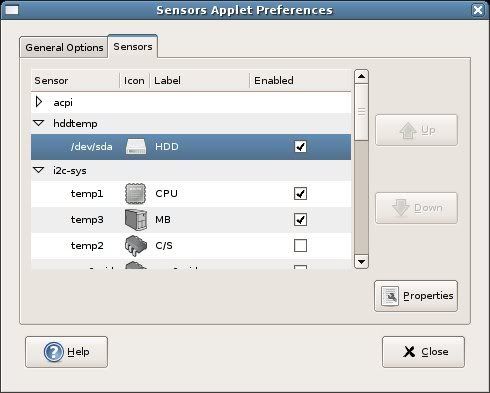
Today, in our Linux Page (in Spanish) we strongly suggest a very useful applet for every Gnome OS: GSA. The Gnome Sensors Applet let you constantly check the hardware sensors, including CPU temperature, fan speeds and voltage. GSA is very easy to install and manage; its intuitive graphical interface allow you to decide what alarms you prefer to display in case of emergency. GSA is recommended for all the Linux users who constantly push the limits of their pc. 
Security package for Ubuntu: antivirus, firewall and P2P stealth
Linux is the safer OS you can use today: specific Linux viruses are few and malware is rare but with the increasing of users some threads are becoming real. For this reason, I strongly believe that nowadays a simple firewall is not enough we all need also a good antivirus. Today, in our Linux Page we’ve posted a short manual where we explain how to install a firewall (Firestarter), an antivirus (Avast) and a P2P stealth (Peer Guardian). We have tested all this software on a Ubuntu 7.04 without relevant problems; the combined use of this triplet is strongly recommended for people who desire to preserve their data and privacy.