After only few days from the release of Ubuntu 7.10, the pendrivelinux.com has released the new manual to install this new version of the famous Linux distro on a USB key and we have posted a short but effective review about this new manual on our Linux Page (in Spanish). As usual the instruction contained on the site are very clear and simple to follow. We have been able to create our Ubuntu 7.10 Key in less than 40 minutes and without any particular problem. Unfortunately, we were not able to save the changes we had made to personalize our USB key but we really enjoy the possibilities offered by a so powerful OS as Ubuntu (if someone knows how to save the changes, please, post a comment – Thanks). Strongly recommended!

Category Archives: Ubuntu tips
HTTrack: a very useful multiplatform (Windows, Linux and OS X) website copier!
This week we have reviewed a useful multiplatform (Windows, Linux and OS X) software dedicated to all the people who desire read their favorite web-sites also when disconnected from the web. HTTrack is a very powerful program which contains easy (not always unfortunately) features to download complete websites and navigate them when outline. In our Freeware Page you can find a brief but incisive review about this program. Moreover for the Linux geeks, we inserted some tips (how to install and useful links) about HTTrack in our Linux Page. Sometimes the use of HTTrack could be a little difficult but after some experiments you will be able to manage it without problems. Enjoy it! 
SoundConverter: the best (and the simpliest) audio converter for Ubuntu!
This week, in our Linux Page (in Spanish) we have posted a review SoundConverter which is, in our opinion, the best and perhaps the most complete audio converter for Ubuntu. SoundConverter is very simple to install and after few minutes you will be able to freely “play” with your music library. SoundConverter plays: Ogg Vorbis, AAC, MP3, FLAC, WAV, AVI, MPEG, MOV, M4A, AC3, DTS, ALAC, MPC, Shorten, APE and writes: WAV, MP3, FLAC and Ogg Vorbis files. In the SoundConverter website you can also find some useful extra instructions about “how to enable mp3 output“. More in general, please don’t forget to take a look at the Ubuntu Documentation site to learn how to play restricted formats on your Feisty. 
Lubi: the Linux based Ubuntu Installer
Lubi is a useful tool for all people who like to experiment different Linux OS on their PCs. In particular Lubi has been thought to let you install Ubuntu in just few clicks and without risking annoying “secondary effects” on your computer. In our Linux Page (in Spanish) we have posted a small but effective review with all the necessary links to the Lubi project and we have also listed all the Linux OS (PCLinuxOS 2007 32-bit, openSUSE 10.2 32-bit, Gentoo 2007.0 32-bit, etc..) already tested for a safe -Lubi- use. We strongly recommend Lubi for all users who want to deeply test Ubuntu (and its features) without starting from the Live CD. 
How to extract archives (ACE, ARJ, CAB, CHM, CPIO, DEB, ISO, JAR, LZH, NSIS, OOo, PAK/PK3/PK4, PET/PUP, RAR, RPM, SLP, Z/TZ) and create many others in just few clicks: PeaZip!
Today, in our Linux Page (in Spanish) we have post a review about PeaZip: a terrific program which is able to solve many common problems when extracting certain types of archives such as ACE, ARJ, CAB, CHM, CPIO, ISO, Java archives (JAR, EAR, WAR), Linux installers (DEB, PET/PUP, RPM, SLP), LHA, LZH, Open Office file types, PAK/PK3/PK4, RAR, Windows installers (NSIS, some MSI), Z/TZ. This program was developed in two different versions: for Windows (XP and Vista) and for Linux. Moreover a powerful portable/standalone version (for both Windows and Linux) is available. Last but not least, using PeaZip you will be also able to create 7Z, 7Z-sfx, BZip2, GZip/TGZ, PAQ8F, PAQ8JD, PAQ8L, PEA, QUAD, split (.001), TAR, ZIP archives. In few words, PeaZip is tiny, extremely useful and easy to use program: strongly recommended! 
Gnome Sensors Applet (GSA): a -must have- applet for your hardware security in Gnome OS!
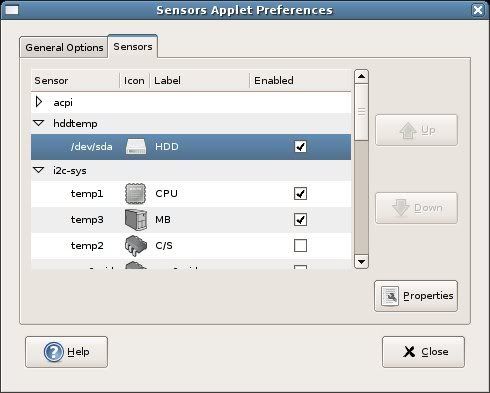
Today, in our Linux Page (in Spanish) we strongly suggest a very useful applet for every Gnome OS: GSA. The Gnome Sensors Applet let you constantly check the hardware sensors, including CPU temperature, fan speeds and voltage. GSA is very easy to install and manage; its intuitive graphical interface allow you to decide what alarms you prefer to display in case of emergency. GSA is recommended for all the Linux users who constantly push the limits of their pc. 
Two interesting sites for IT news and a nice proposal to personalize your desktop: Perfect Fantasy
Perfect Fantasy is a nice, well shaped collection of blue and/or pink icon. This collection is very attractive and contains 62 icons in three different formats (PNG, ICO and ICNS). From the website it is possible to download also two wallpapers (blue and pink) for a perfect customization of your desktop. Last but not least, today, in our hi tech news and tips Page, we posted new links about two very interesting websites. 
Wubi: one of the best Ubuntu installers for Windows users.
Today, in our Linux page we have posted a brief review about Wubi: a simple and effective Ubuntu installer for Windows users. With just few clicks you can easily install Ubuntu without modifying the partitions on your pc (for this reason there are no -or very low- risks of “fatal errors” for your computer). All the Ubuntu files are stored in just a single folder so it is very simple to uninstall Ubuntu if you decide not to use it anymore. In few words, Wubi allows Linux beginners to try all the positive features of Ubuntu without risking undesirable secondary effects. Recommended! 
Security package for Ubuntu: antivirus, firewall and P2P stealth
Linux is the safer OS you can use today: specific Linux viruses are few and malware is rare but with the increasing of users some threads are becoming real. For this reason, I strongly believe that nowadays a simple firewall is not enough we all need also a good antivirus. Today, in our Linux Page we’ve posted a short manual where we explain how to install a firewall (Firestarter), an antivirus (Avast) and a P2P stealth (Peer Guardian). We have tested all this software on a Ubuntu 7.04 without relevant problems; the combined use of this triplet is strongly recommended for people who desire to preserve their data and privacy.