Category Archives: News

Link

Not all USB type-C ports are equal: Nine versions of USB-C incoming

Link

MIT invents ‘breakthrough’ 3D printer that can print 10 different materials simultaneously 

Link

Pentagon teams up with Apple and Boeing to develop wearable tech

Link

Cybercrime and Cybersecurity – The Legal and Regulatory Environment by Colin Renouf

Flipboard and Pulse vs. local RSS = Free online services vs. indipendence -and privacy-

The first time I noticed Pulse on my friends’ Iphone I was astonished. It as what I was looking for since my first Nokia phone: the possibility of read a personalized selection of my favorite news directly on my mobile.

Moreover, Pulse was able to load images so I had the possibility to directly access graphs or pictures. I was amazed and I spent a lot of time to select the right RSS to feed it.

I was sure that Pulse was the best app for different reasons. The main was its Android version that allowed me to not worry about the next mobile I would have chosen in (the very near) future. The second was its flexibility! I was able to choose feeds from its huge library or directly add my favorite RSS if the specific feed was not available. When Pulse started its website Pulse.me I was sure that I would have been one of its best fans for the life.

The same feeling I had with Flipboard. It was easy to use too. Flipboard had a more attractive look and it was able to suggest many interesting news as soon as I selected the favorite categories in its menu. For my feelings Flipboard was a bit too invasive because I was not able to actively define the precise sort of news it was suggesting me but it was still useful for my purposes.

The first doubt about Pulse emerged when it was acquired by Linkedin… Why I would have to connect my news selection with other Linkedin users? On one hand the selection could represent an extra element to describe, in a more complete way, my professional profile but, on the other hand, my RSS feed selection was also a personal added value that (for my opinion) gave me a plus towards my potential competitors.

Information are money. And RSS news feeds can sometimes represent the main part of the concept of information. When I decide to share my RSS selection I automatically decide to wipe out this difference between me and other “competitors”. And perhaps I am deleting part of my personal better skills.

For this reason I decided to not link Pulse to Linkedin and I loose the trust I had for it.

At the end I decided that I would have preferred to test a simple RSS reader on my notebook. In few words I opted for less mobility to more independence (and privacy).

And the nightmare began….

In fact I was not able to download the RSS feeds I had in Pulse and in Flipboard. Because it is simply not possible. If you decide to use Pulse or Flipboard you are welcome but that is one way path. You are not allowed to easily leave them. If you want, you can always cancel your account but all the RSS you saved on your account cannot be downloaded. If you really want to opt-out you have to manually copy them to your local RSS reader.

I let you image how much time I wasted copying and pasting a five year long RSS feeds history to Akregator but it was the only way that I caused myself for not reading the TOS when I registered to Pulse and Flipboard.

I just want to focus your attention to one point. Beware to similar online free services. They are useful till you decide to use them but, when you change your idea, they can become a real, real problem.

I was a silly user. In fact, accepting the TOS, I gave them the legal authorization to monitor and use my RSS selection as they preferred without any warrant about the possibility of withdrawing in a easily way. I am not a genius nor an Internet evangelist so I really don’t think that my personal RSS feed selection could have a big commercial value for anyone. But when I think that my 2 cents RSS selection could be summed to a virtual infinite number of other 2 cents feed selections I feel myself silly.

The advice I’d like to give you is about TOS. Read them and, before accepting TOS, be sure that the agreement you are signing is enough convenient for you.

Decide if the authorizations you are giving them can compensate what they are offering to you for free. And…. be sure you can easily and freely save and/or re-use the data you have been sharing with them for so many years.

A small collection of Firefox add-ons you can install to improve (a little bit) your privacy – Part 3

In the past two years the EFF – Electronic Frontier Foundation –  has released a couple of add-ons specifically created to improve your privacy when you are on Internet. Just for a quick information, EFF is a no-profit organization specialized in, but not only, the defense of  privacy and free expression in the contemporary “world of emerging technologies”.

The first interesting EFF add-on is HTTPS Everywhere  that forces websites to provide https webpages also when you (better: your browser) asked for a “common” HTTP connection to their servers. This happens automatically and you don’t usually notice any delay in your navigation speed. HTTPS Everywhere is a precious add-on because it improves the number of “secured” connections when you are on Internet and decreases the risks of information leaking during Internet navigation. Moreover, this add-on is available not only for Firefox but also for Chrome and Opera and, at the moment, could be considered as the most versatile and -simple to use- tool you have to increase the use of HTTPS navigation. HTTPS Everywhere could not be considered as a bullet-proof privacy guarantee but it really does what he promises. Last but not least, it seems that if you adhere to their anonymous data collection about usage, you can really help them to discover false HTTPS certification disseminated through the web and contribute to a safer Internet.

If you want a little bit of security and think that every website should allow to connect through HTTPS, you should try HTTP Nowhere  that blocks all the unencrypted web communications. As for what we described for Flash add-ons (Flash Control and Flash Block) the level of security depends on your choice. HTTP Nowhere is a more “radical” choice but, i any case, it can be widely configured to your needs. For example it allows you to create a whitelist of HTTP websites that will be never blocked. Moreover HTTP Nowhere can be configured to visit .onion websites through TOR.

In  any case don’t forget that HTTPS connections are only relatively more secure than HTTP ones. As someone commented, HTTPS effective privacy depends on Certificate Authorities reliability and seriousness and, in some cases, HTTPS could be easily eluded. 

The other EFF add-on I’d like to focus your attention is the Privacy Badger . This add-on has the same goals of the most famous Ad Block or Disconnect but it works in a different way. In fact its work is not based of previously compiled list the needs to be updated frequently but on an heuristic examination of trackers behaviour. It could be considered “democratic” because it doesn’t automatically ban trackers at all but analyzes if they are looking for your web habits or they are “just” recording your passage in a specific website. In this last case the Privacy Badger will observe their behaviour during your next navigation and, if they persist to track you, it will label them with different colours (green to yellow to red) blocking them when they become too intrusive for your privacy. The PRO is that also a brand new tracker -never reviewed by security advisers- will be promptly discovered and neutralized but the CONS is represented by the fact that also the most known intrusive tracker will be initially allowed to register your habits.

For its intrinsic features, the Privacy Badger could be added to Firefox as an extra barrier to fight trackers and improve your privacy. In the next post we will examine other add-ons that can be matched with it.

Link

Internet Trends 2015

Wireless Power Transmission: real available technology and marketing advantages

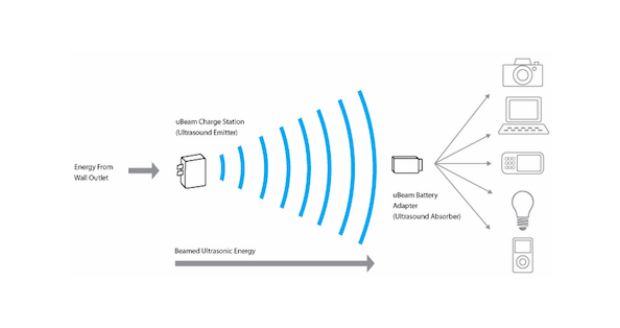
ubeamWireless energy transmission for remote charging is one of the most strategic key factor for the development of a new generation of tech devices in the near future. Few years ago some futuristic thinkers forecasted the possibility of wireless energy transmission between far places. In particular the academic community was interested in energy transmission between the planet earth and orbiting satellites equipped with solar power stations. 
This long range power transmission technology would radically change the energetic, economic and power equilibrium of our world but unfortunately, at the moment, this technology is not available. 
On the contrary, near range power transmission is something near the corner. 
After long researches an USA company  is launching the first generation commercial version of a wireless power transmitter with ultrasound that will allow to recharge (for the moment) mobile phones in a range of 15 feet (4.5 meters) just using a special cover. 
Fifteen feet are not a long range nor a medium one but the important thing is that it is contactless and that 15 feet start to be an interesting distance. 
So interesting that a big coffee shop chain as Starbucks  is considering to introduce these remote charging devices in all its shops. 
In this way all the customers will be able to automatically and freely charge their mobile devices as soon as they enter into the coffee shop. A good added value considering how much energy our devices need when strongly used during the day. And consequently, for many people, a good reason to prefer a store to another one. A potentially viral added value as well as a magnetic marketing strategy!
Last but not least, it must be considered that the success of this kind of technology operations is determined by costs. At the moment it is not possible to find any information about prices for the mobile device covers at the end consumer side. If the end users price for covers will be high, the huge, positive effects of a partnership with a big player as Starbucks couldn’t be enough without some kind of tech fashion pivot. 
Good luck uBeam! You have the right idea!
————–
References:

Google Reader will be soon out of service… What’s the next best solution? netvibes.com or theoldreader.com?

At this point it’s history: Google will be out of service by the next July. It could appear nonsense but I still think that RSS readers are the most flexible solution for people who need to stay updated. Social media represent a possible solution but, in my opinion, nothing is better and more powerful than RSS.

Digg.com has promptly announced the launch of its own alternative online reader but, for now, none is able to say when it will be ready. Moreover Digg has not provided any information about this new RSS reader and so we cannot comment any of its potential feature neither compare it with the “old” Google Reader.

Surfing the web, many possible alternatives will pop-up but just few are the right ones if you don’t want to wait Digg.com. At the moment netvibes.com (in the past it was also known as bloglines.com) is the most immediate solution because allows you to import OPML – XML setting from your Google Reader. In fact, you can save all your Google Reader settings in a OPML – XML file just using the Import/Export panel into the Settings Menu (Download your data through Takeout) into the Google Reader. Netvibes.com represents an easy and fast alternative but I personally don’t like the graphic layout offered by this free online service. It is easy to use, really flexible and cozy but it doesn’t run properly on old computers because dated hardware, with inadequate graphic cards or small RAM, will slow down your OS when you visit netvibes.com. Last but not least you can decided to keep private your RSS selection, share it on social media or allow people to visit directly the webpage containing all the feeds you selected and/or just a single RSS box.

My other choice is represented by theoldreader.com that is the real successor of Google Reader. Theoldreader.com has the same features than the Google Reader and it is really nice to see and read if you like the clean, evergreen layouts. Theoldreader.com allows you to sign in using your Google account and it is possible to import the OPLM -XML configuration file you saved from your personal Google Reader. The only problem with theoldreader.com is represented by the time you have to wait before it will import the OPLM – XML file you uploaded from Google Reader. In my experience I had more than 22,000 people before me in the queue and I had to wait for, more a less, a week before I was able to use it with the imported parameters… Theoldreader.com has some advanced features which allow you to share your RSS selection and save the most interesting in order to create a more private collection for your specific interests. Not bad and useful!!  AddThis