This week, in our Linux Page (in Spanish), we posted a brief tutorial about installing XBMC on Ubuntu 8.10. As you certainly know, XBCM is a complete Media Center based on Ubuntu. This program is multiplatform (Linux, Windows, OS X and also XBOX – not officially supported-) and, in our opinion, is the most efficient and complete open source media center you can find today on the Internet. Moreover, XBMC has developed a special version that could be installed on a USB Key on a Live CD to freely test the application before installing on your PC. The post is brief but contains all the complete instructions to quickly install XBMC without problems. Please, be sure to digit sudo apt-get update in Terminal after you install the new repositories. Recommended!!

Category Archives: Linux Distros
Save your money! Install DeLi Linux on your old (or “ancient”) PCs!
Today, in our Linux Page (in Spanish) we added a post about DeLi Linux, an interesting distribution which allows you to use your old PCs and save money. The first time we tested DeLi we sincerely did not believe to obtain so interesting results. In fact we were able to install DeLi on very old PCs and laptops (486) with at least 64MB of RAM. About the RAM, we found some screenshots on the DeLi website where it runs on laptops with just 16MB of RAM. Moreover, DeLi is very light, 251.1MB for the ISO and 750MB of hard disk when installed. This particular version of DeLi Linux, the 0.8, is very flexible and complete if we think that it contains all the main programs that a medium user can ask. When we try to install it on the PCs, we have not found particular matters: the installation was easy and enough fast. When used, DeLi is fast and stable; in few words we could affirm that DeLi represents a strong reality for all that people which are looking for a PC or laptop and do want to spend just few bucks… Recommended!!

Damn Small Linux 4.2.5: the new updated version!
Today, in our Linux Page (in Spanish) we have posted a review about the new version (4.2.5) of Damn Small Linux. Damn Small Linux is one of our favourite distribution due to its capability to run on very old PC as 386/486/Pentium with very few hardware resources. This version has updated some features as Monkey Webserver 0.9.2 and is incredibly stable (as the previous ones, I must say). According to distrowatch.com, in the last 12 months Damn Small Linux has been the 10th most downloaded (and consequently used) Linux version also because, with no costs, many people are converting old Windows based machines to new up-to-date computers. Anyway, Damn Small Linux is based on Knoppix but is smaller and contains many improvements. Last but not least, I would like to focus your attention on the five different subversions available:
– dsl.iso is the standard isolinux version
– slinux.iso uses syslinux instead of isolinux (for very old PC’s)
– vmx.zip can be run in VMware Player
– embedded.zip contains QUEMU for running inside Windows
– frugal_lite.sh is the network install script and requires tomsrtbt linux: http://www.toms.net/rb/.

Ubuntu iES: a terrific -Spanish- Ubuntu on a pendrive!
Today, in our Linux Page (in Spanish) we have posted a brief review about Ubuntu iES, an interesting Live Ubuntu which can be loaded on a small (1GB) pendrive. This particular Live version has been built for Spanish speaking users. Ubuntu iES is completely automatic, in fact its software completely manages the installation. Actually, when the pendrive loads the Ubuntu iES you can easily choose between Gnome, xfce4, Enlightenment; moreover, it is also possible to decide the right graphic card and the appropriate drivers for WIFI. Last but not least, Ubuntu iES website contains simple and clear instructions about saving all your settings and data for the next live session. Personally we recommend this live version of Ubuntu to all Spanish speaking users because it is not simple to find (around the web) a better Linux distribution on a pendrive. As usual, please, inform us if you know something better!

How to install Ubuntu 7.10 on a USB Key!
After only few days from the release of Ubuntu 7.10, the pendrivelinux.com has released the new manual to install this new version of the famous Linux distro on a USB key and we have posted a short but effective review about this new manual on our Linux Page (in Spanish). As usual the instruction contained on the site are very clear and simple to follow. We have been able to create our Ubuntu 7.10 Key in less than 40 minutes and without any particular problem. Unfortunately, we were not able to save the changes we had made to personalize our USB key but we really enjoy the possibilities offered by a so powerful OS as Ubuntu (if someone knows how to save the changes, please, post a comment – Thanks). Strongly recommended!

NimbleX: a customizable Linux (Slackware based) Live CD
In our Linux Page we have posted a brief review about NimbleX: a customizable Live CD based on Slackware. To build your own distro you have only to connect to NimbleX site and follow the simple instructions on the screen. The number of available programs is not huge but with a couple of tests you can built a very good personalized Live CD without knowing anything about programming (unfortunately, it is possible to create only one Live CD every day). You can also customize the background and the boot audio greeting using your favorite images and messages. NimbleX is so easy and fast to use that it’s a pleasure to use it. Recommended! 
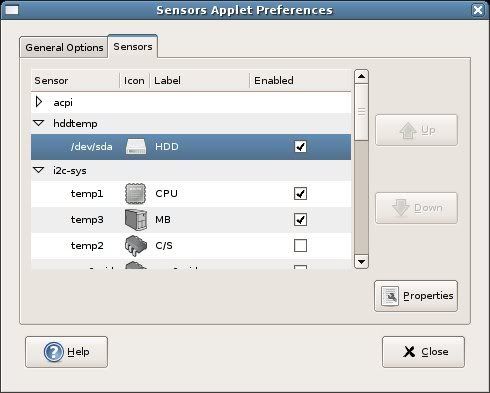
Gnome Sensors Applet (GSA): a -must have- applet for your hardware security in Gnome OS!
Today, in our Linux Page (in Spanish) we strongly suggest a very useful applet for every Gnome OS: GSA. The Gnome Sensors Applet let you constantly check the hardware sensors, including CPU temperature, fan speeds and voltage. GSA is very easy to install and manage; its intuitive graphical interface allow you to decide what alarms you prefer to display in case of emergency. GSA is recommended for all the Linux users who constantly push the limits of their pc. 
Ubuntu 7.04: a complete Linux on a USB PenDrive
Today, in our Linux Page, we want talk again about bootable Linux on pendrives. This time we discovered that the guys from http://pendrivelinux.com/ released a new USB portable Linux: Ubuntu 6.10. We tried to use Ubuntu 7.04 instead 6.10 and… it works (in our test: Windows installation on 1GB pendrive)! As for Knoppix 5.1.0 (see our post on January 26, 2007) also this portable version of Ubuntu 7.04 is easy to be installed on a USB key and it’s full of interesting features. For the installation you have to carefully follow the instruction contained on the specific pendrivelinux pages (more instruction also available for installation using Linux). Please don’t be worried after the first reading because all the necessary steps are well explained and if you follow them it’s really not possible to make mistakes! Enjoy it! 
DreamLinux 2.2 MME: a new interesting Linux CD distribution in Portuguese and English
In our Linux page Frank posted a detailed review about DreamLinux 2.2 MME (multimedia edition). This distribution, available in Portuguese and English has a very clean graphical interface and is built to facilitate Linux beginners. In fact, not only DreamLinux is very updated for office pourposes but it contains many useful application for multimedia, programming, science and graphics. Moreover, DreamLinux has an “easy install” resource which easily help you to install new compatible Linux applications. The tutorials page (written in English) contains many useful tips for DreamLinux beginners. We like DreamLinux especially because the packages are updated and because it offers good graphic interfaces.
UCK 1.4: how to buid your personalized Ubuntu-Kubuntu live CD – DVD!
Today, in our Linux Page, Frank has posted some useful notes about how to create a personalised live CD-DVD based on Ubuntu or Kubuntu. UCK 1.4 is the new powerful version of Ubuntu Customization Kit which allows you to easily customize the main Ubuntu functions: kernel, languages, software and … create in just few clicks.. your personal live Ubuntu CD. You can use UCK just for fun or to develop your ideal Ubuntu distribution to spread on the web. Enjoy it!