Tag Archives: Linux & OpenSource

Linux Security Distros Compared: Tails vs. Kali vs. Qubes

Linux Security Distros Compared: Tails vs. Kali vs. Qubes by Thorin Klosowski via lifehacker-logo

Are you looking for the safest version of Linux? The best for your tasks?

Ask yourself why do you seek a Linux operating system with high performance in terms of security and test one of those Linux OS proposed in the link above.

I think they are the best Linux distributions today …. or does anyone have any better suggestion? If so, please write a comment below! Thank you.

Link

Advanced Data Recovery on Linux

It’s the perfect nightmare and everyone do all his best to avoid it but sooner or later it happens.

Loosing data from a hard disk or a USB device is more common than you can image and everyone has experienced it!

Windows has different commercial solutions available to recover data and partitions but, if you use Linux, you need something different.

The best solution I found for Linux is an old but current article by Lifehacker.au that I strongly recommend if you are experiencing this kind of problems and want to solve them.

Continue reading

Link

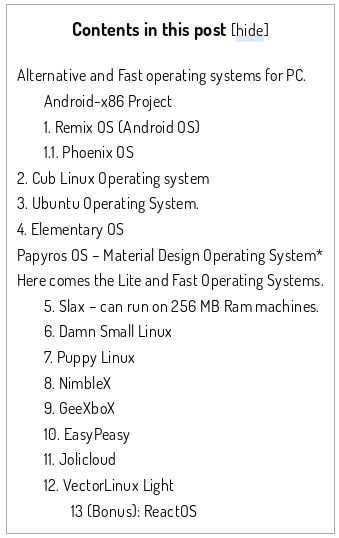
12 Light and Fast PC Operating System For Old PC, Laptop and Tablet by Devendra via quickfever-v1-5

“If your computer having problems or lags while using Windows operating systems, you’ll discover some fast and lightweight OS in this article. There is another post where we discussed best alternative operating systems that are not specifically for old PC’s”

screenshot-www-quickfever-com-2016-11-15-19-46-56

It’s time to find the best Linux Distro for your old laptop!

tuxAre you looking for a up-to-date Linux Distro to use that old laptop you have in the dust in the far corner of your garage? It could not be so easy to find the best Linux Distro to install on it but howtouselinux.net did some great twests for all us:

What is the best Linux distro for Laptop? 

The review is really well-done and the graphic display of results let you to quickly choose what is the best Distro candidate for your laptop depending on hardware, your tastes and the final use you want to give to your laptop.

In my experience the howtouselinux.net review let me to save a lot of time because I was able to focus my tersts just on the two Distros that seemed to have the right prerequisites for my old eeepc 900:  Peppermint OS and Macpup. Recommended!

375x150-embossed


3 steps to install DNScrypt to improve your privacy – Ubuntu version

Also if you use OpenDNS to improve your standard of privacy, you are not protected by “last mile” dangers but you can boost your security installing DNScrypt on your digital device. DNScrypt “works by encrypting all DNS traffic between the user and OpenDNS, preventing any spying, spoofing or man-in-the-middle attacks”.

DNScrypt “is a protocol that authenticates communications between a DNS client and a DNS resolver” and it “is not a replacement for a VPN, as it only authenticates DNS traffic, and doesn’t prevent “DNS leaks”, or third-party DNS resolvers from logging your activity”.

For this reason you have to be conscious that DNScrpt is just a -very good- improvement of your privacy but not the definitive solution to all your privacy concerns.

DNScrypt is so versatile that you can install it on every kind of device you prefer. In fact it is possible to download DNScrypt for servers, IOS, OSX, Android, Windows and Linux computers (DNScrypt-proxy version). Obviously the installation and setup will vary a little depending the OS you installed on your device.

Concept-Skyscraper-Feeds-on-Air-Pollution-Uses-It-to-Grow-433607-2

Image from softpedia.com

Here we are talking about DNScrypt installation on Ubuntu.

For this purpose I suggest to use the Terminal that allows you to install DNScrypt i just 3 steps:

sudo add-apt-repository ppa:anton+/dnscrypt
sudo apt-get update
sudo apt-get install dnscrypt-proxy

Last but not least, you need to interface the Internet traffic of your computer through the DNScrypt-proxy. For this reason you have to Edit your Network Configuration and add the address 127.0.0.2 to the “DNS Servers” line as for the below screenshot:
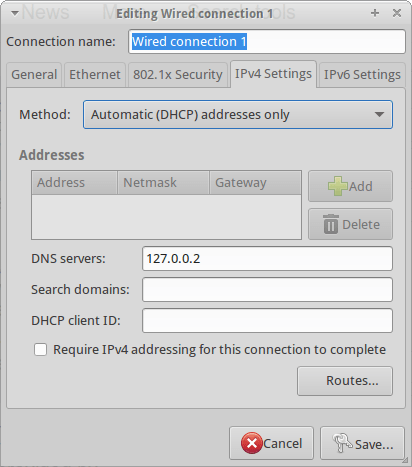
DNSCrypt

Now you can start DNScrypt just typing:

sudo dnscrypt-proxy -R opendns -a 127.0.0.2:53 -u okturtles

Where, in my specific case, okturtles is the name of the remote DNS resolver I decided to use. I chose that specific risolver from the list I found into into my computer after DNScrypt-proxy installation:

/usr/share/dnscrypt-proxy/dnscrypt-resolvers.csv

As usual in similar situations, you may want to spend another couple of minutes to configure your computer to start DNScrypt at the computer boot. Open the Session and Startup manager through the desktop Dash and Add this specific command to the Application Autostart menu:

sudo dnscrypt-proxy -R opendns -a 127.0.0.2:53 -u dnscrypt

Wireless Power Transmission: real available technology and marketing advantages

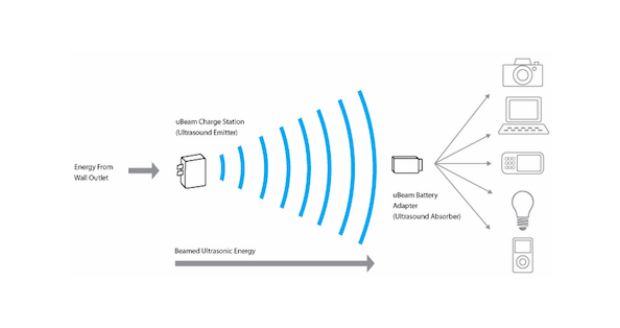
ubeamWireless energy transmission for remote charging is one of the most strategic key factor for the development of a new generation of tech devices in the near future. Few years ago some futuristic thinkers forecasted the possibility of wireless energy transmission between far places. In particular the academic community was interested in energy transmission between the planet earth and orbiting satellites equipped with solar power stations. 
This long range power transmission technology would radically change the energetic, economic and power equilibrium of our world but unfortunately, at the moment, this technology is not available. 
On the contrary, near range power transmission is something near the corner. 
After long researches an USA company  is launching the first generation commercial version of a wireless power transmitter with ultrasound that will allow to recharge (for the moment) mobile phones in a range of 15 feet (4.5 meters) just using a special cover. 
Fifteen feet are not a long range nor a medium one but the important thing is that it is contactless and that 15 feet start to be an interesting distance. 
So interesting that a big coffee shop chain as Starbucks  is considering to introduce these remote charging devices in all its shops. 
In this way all the customers will be able to automatically and freely charge their mobile devices as soon as they enter into the coffee shop. A good added value considering how much energy our devices need when strongly used during the day. And consequently, for many people, a good reason to prefer a store to another one. A potentially viral added value as well as a magnetic marketing strategy!
Last but not least, it must be considered that the success of this kind of technology operations is determined by costs. At the moment it is not possible to find any information about prices for the mobile device covers at the end consumer side. If the end users price for covers will be high, the huge, positive effects of a partnership with a big player as Starbucks couldn’t be enough without some kind of tech fashion pivot. 
Good luck uBeam! You have the right idea!
————–
References: