
“Shape of the Web shows you where the Web stands today, the issues that impact it and what you can do to get involved.”
Author Archives: Galigio
Blogilo: the Linux blog client to create new posts on your local computer
Leave a reply
 Yes, I know! Talking about Blogilo is not an hot news but the “recent” version 1.1 (according to the Help Menu in Blogilo software) has added some new features and something has changed. Some years ago, when I tested Blogilo, I thought that this software was a good “concept” but it lacked of too many features as compared with e.g. online WordPress.com platform. With version 1.1 these lacks have been reduced and now Blogilo becomes interesting if you are looking for a software that could be used daily for offline posting.
Blogilo now has less bugs than in the past and it is possible to write posts with just few seldom crashes. The user interface is intuitive and after the installation you spend just few minutes for adding and setting your blog. The positive thing is that Blogilo works with all the main blog platforms and it could be considered as one of the most complete blog client for Linux.
The matter is that blog platforms evolve quickly and Blogilo, as all its competitors, seems to be slower than many of them. In fact, it could happen that some up-to-date features are immediately not supported and you have to manually modify your post and adding them directly through the host website (e.g. WordPress).
One of the most annoying problems I continue to have with Blogilo is about wrapping text around the image/picture I am used to put at the beginning of every post I write. It is a simple matter to solve but at every post I have to manually change the html code.
As for my experience you have two different ways to solve this isssue.
The first is to edit the image/picture after you inserted it into the post and add the value “allign” selecting the right options in the Advanced Menu (why the Advanced Menu is not available when you insert a new image/picture?).
The second (faster) is to go to the Html Editor tag into Blogilo and add this code at the end of the image <img> tag:
align="left"
For example writing this post I added:
<img src="http://i119.photobucket.com/albums/o158/galigio/blogilo_logo_zps3pmqrnq1.png" align="left" width="160" height="105">
Simple to solve but really annoying when you have so little time to dedicate to your blog….

To sum up it is possible to affirm that Blogilo really contains all the features to write a blog but if you need something more professional you have to spend some hours, after the installation, to learn how to find the right solutions for your specific needs.
———–
References:
Wireless Power Transmission: real available technology and marketing advantages
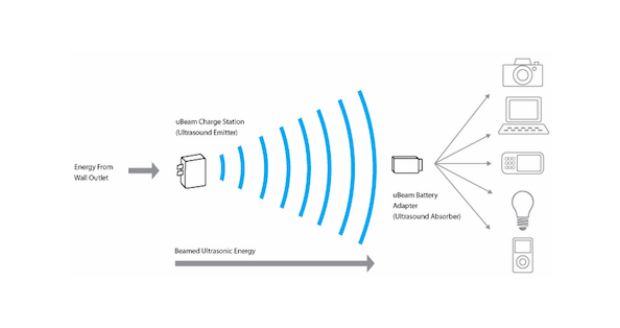 Wireless energy transmission for remote charging is one of the most strategic key factor for the development of a new generation of tech devices in the near future. Few years ago some futuristic thinkers forecasted the possibility of wireless energy transmission between far places. In particular the academic community was interested in energy transmission between the planet earth and orbiting satellites equipped with solar power stations.
 Update from Fedora 18 to 20 or 21 in few simple clicks and without (I hope) problems!
 Sometimes simple things become hard problems. This happened to me when I discovered that my Fedora 18 OS was obsolete (very old indeed) and I tried to upgrade it to the Fedora 20 version.
Fedora 18 doesn’t support the automatic OS upgrade so I had to spend some hours to find information on Internet and create the right DIY solution for my case. At the end of my little (sic!) research I discovered that I was able not only able to upgrade the PC to Fedora 20 but I also found a good “trick” to upgrade to the latest Fedora 21 following in just a couple of steps with the help of fedup and some other escamotages.
This is how I succeed…
First, you have to open a Terminal and type:
su
init 3
but you will immediately leave the Fedora GUI and so it’s better if you write the below commands on an -old style, paper notepad- to be sure to have all the right information in you hands and correctly manage the upgrade from Fedora 18 to Fedora 20
sudo su -
yum update
yum install fedup
fedup-cli --network 20 --nogpgcheck
It’s better to add –nogpgcheck because often you are not able to complete your upgrade for the “old”, “bad saved” gpg key in your system.
reboot
Now, at the boot-up menu (GRUB 2 menu) you have to choose “System Upgrade (Fedup)”.
Then just to be sure you really have an up to date OS, in Terminal, type:
Yum update
If you have problems with one or more of your “old” repositories don’t forget to deconfigure them. In my case I had to launch this command line in Terminal due to skip an old repository and proceed with the upgrade:
yum-config-manager --save --setopt=home_moritzmolch_gencfsm.skip_if_unavailable=true
At this point, to upgrade from Fedora 20 to Fedora 21 you have to open (again) the Terminal and type:
su
fedup --network 21 --product=workstation --nogpgcheck
OR
fedup --network 21 --product=server --nogpgcheck
(if your Fedora version is the server one)
OR
fedup --network 21 --product=cloud --nogpgcheck
(for the Fedora cloud edition for generic virtual machines or Container)
Take it easy and go to bed for a long snap because, in my case, the download took some hours as for 2,577 files to be upgraded…
At the end, as before, you have to Reboot and select “System Upgrade (Fedup)” at the boot-up menu (GRUB 2 menu) and all the necessary files will be installed. Again, take a good book to read while you wait the installation.
Good luck and remind you MUST backup all your data before you start any upgrade because unforeseen risks are always around the corner!
References:
https://ask.fedoraproject.org/en/question/37247/upgrade-fedora-18-to-fedora-20-via-yum-or-fedup/
http://tecadmin.net/steps-to-upgrade-fedora-19-to-20-using-fedup-tool/
http://www.unixmen.com/upgrade-fedora-20-fedora-21-using-fedup/
https://ask.fedoraproject.org/en/question/39558/how-to-remove-a-repository-from-my-system
How to delete – double – icons on your Android smartphones!
 The first time I noticed doubled icons appearing on my Android 4.4 smartphone I thought that it was a temporary problem. So I tried to solve that with a simple reboot but I didn’t succeed.
Moreover when I tried to delete just one of the doubled icons I uninstalled the App…. This kind of matter is typical of smartphones and it usually doesn’t happen on tablets or Android PCs where you have a dedicated room (the “menu” page) to uninstall software (Apps) and different “screens” to organize them.
This means that if you delete a App’s icon from one of the “screens” you will still have your software installed into your device. The problem of double icons on smartphones is caused by a wrong configuration of your personal settings on Google Play Store.
To solve it, you have to:
1 – find all the problematic Apps;
2 – go to Google Play — Settings – and deselect “Add icon to home screen”;
3 – uninstall the “problematic” Apps;
4 – reinstall them.
To conclude it’s better to solve this kind of problem as soon as you notice it because, to solve the matter, you will have to waste your time uninstalling and reinstalling all the Apps with doubled icons.
How to transfer an Amazon.com Kindle account to another country .uk .de .es .it…
 If you move from USA to another country you would like to change your Amazon settings due to buy your books in the “new” local Amazon store.
The first step is to login into your Amazon.com and open the Manage your Contenent and Devices page. Then you have to go to the Settings tab and modify the Country Settings field. Fill in the requested information and press Update.
A pop-up advice will appear on the upper part of the webpage:
Great news! You can now shop for digital content at Amazon.it in Euros
Learn more about transferring to Amazon.uk (de-it-es)
Have you moved recently? You may change your country on the Manage Your Content and Devices page.
Click on “Learn more about transferring to Amazon.uk (de-it-es)” and then, when in the new page, click on the yellow button “Transfer your Kindle account to Amazon.uk (de-it-es)“
Now you will be redirected into your new national Amazon’s homepage where you will be requested to login again. A welcome message confirms your account transfer and you will able to start managing your local account.
Teenagers are leaving Facebook. Why? Because their parents are on it. [The Guardian]
by Rob Beschizza.
This brief article is interesting because it analyzes a new trend between 16-18 years old EU citizens who prefer alternative social media to Facebook. Moreover, the article describes a new “mood” between young European who “feel embarrassed to even be associated with” Facebook because it is considerate a conservative choice strictly related to their parents relational behaviour. Something to reflect on over the new year!… Tempus fugit! 
Creativeness vs. Big Data analytics: improvement or delay for human evolution?
 After more than one month of silence I would like to end this year with a simple thought about the interaction between technology and our society. I know that usually this blog has principally developed topics about Linux and Freeware but the “Christmas season” could be the right occasion for something different.
A recent post by Matthew Yglesias on Slate, focused my attention on the possibility that big data and “new” technologies could influence our society and personal creativeness in a strange, utilitaristic way.
In the above mentioned post, Matthew Yglesias describes some new possibilities, offered by big data, of deeply analyze the readers behaviour when they use e-readers. Some Yglesias’ examples let us know not only what kind of literature is the most popular today but also detailed analytics about the best number of pages that readers want when they read a certain type of book (e.g. biography or fiction).
These squeezed information drive to the possible next step: a writer could prefer to write a new book on the basis of quantitative marketing data instead of creativity.
In few words, we are potentially slowing the evolution of our knowledge curve because writers could prefer to pander “customers” behaviour and maximize earnings instead of spreading new ideas and theories that could be (sic! are) initially less profitable.
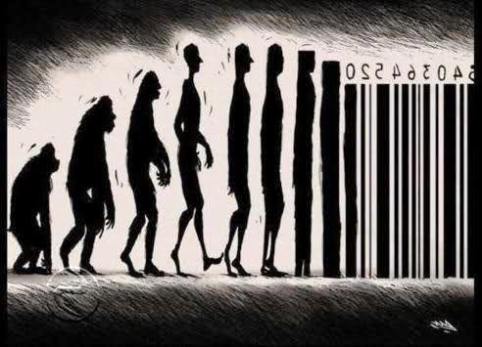
The Darwin “evolution by mistake” will be soon replaced by an utilitarian and transitive “involution by big data marketing analytics”?
It’s impossible to predict but, on the other hand, my hope is that big data marketing analytics will be used just as a tool to maximize and speed new ideas through readers than a mere earning factor to tame buyers.

