Author Archives: Galigio

Ubuntu Christmas editon 2006 – DVD version

UbuntuIn the Linux page we posted a short review about – Ubuntu Christmas edition 2006 -. This fantastic version of Ubuntu is a live DVD which can be freely installed on your PC. This edition is particularly full of useful features, moreover themes & graphics are very accurate. I strongly believe that Ubuntu Xmas Edition 2006 is one of the best Linux you can try (or better install on your pc) if you are planning to use Linux as your main OS. If you are a beginner you have just to put Xmas Ubuntu into the DVD reader and you can enter Linux world!

Portable Skype 3: the new -state of the art- portable Skype!

SkypeToday, in our Freeware Page, we posted some useful links to three different portable versions of Skype. In few lines we describe two classical (old but till succesfully used) versions with all the links to better understand how they work and where it is possible to download them.
Last but not least, we write about the new Portable Skype 3 which recently has released on the web and we put a link where it is possible to download this new fantastic freeware. This new version not only is the best I’ve never used but it is also the simpliest I’ve never installed on a USB. Skype Time! AddThis

Hoversnap: perhaps the best portable freeware for professional snapshot tool.

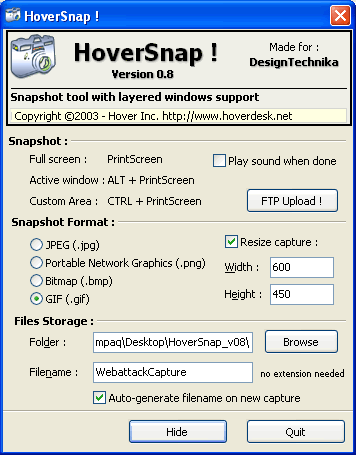
HoversnapHi you all and sorry for a so long silence. Today, in our freeware page we posted a review about Hoversnap, a portable terrific snapshot tool for Windows. This freeware is very light – just 395 Kb- but very powerful! Try it and you will be delighted by this freeware!
We promised you a special gift for the Christmas period and we really are almost ready (sorry for the delay, I think we will be ready in more or less 10 days..). The gift is a collection of portable software which can be used on a 1 GB USB pen. This collection (for Windows) is thought to be very useful and simple to use, you have to just download it and copy on your USB key. See you soon!

How to step into Linux and get KBFX graphics.

Step into LinuxToday in the Linux page you can read two different new posts. The first is about http://www.getgnulinux.org/ a good website full of information and suggestion to step into Linux. The site, with an essential and “easy to read” graphics, is multilingual: English, Spanish and French. In the second post Frank explain how to change the Linux themes using KBFX. Using KBFX you can personalize your K-menu button and it’s menu. Moreover, KBFX is not based on the XP StartMenu but on a hierarchical structure or (you can choose) on the new, flat indexed menu.

IZArc: the best portable free software to manage all archives (zip, tar, etc..)

IZArcThis week we have tested IZArc in our freeware page. IZArc is a terrific freeware to manage many (perhaps I should say: “All”) different formats of archive. IZArc has a very clean interface and in few minutes (after few tests) you are able to use all its features. Using IZArc you can also have a quick look in ISO archives before burning them and directly scan them using your favourite anti-virus. I hope that IZArc developers would create a Linux version in the future because this freeware is really one of the most useful and tiny software I discovered in last months (now it is possible to use IZArc in Linux through Wine). In our Linux page we posted a review about LiveLook, a multiplatform (Linux, MAC OS X, Windows) on-line service to remote control your computers. Unfortunately this web based service will be free for just few more weeks but for the moment it works greatly. AddThis

Super Grub: how to solve boot problems in Linux, Windows, OS Independent

Super GrubSuper Grub is a very practical and useful free bootable cd which can be very useful when you need to solve boot problems in Linux, Windows and other OS Independent. In our Linux page, Frank wrote a descriptive post about the many features you can find (and effectively use) in this terrific bootable cd. Super Grub is very light (just 1.45 MB of cdrom .iso), supports seven different languages and can be downloaded also in its floppy disk version.
Speech Recognition Engines fo Linux: Perlbox and CMUSphinx

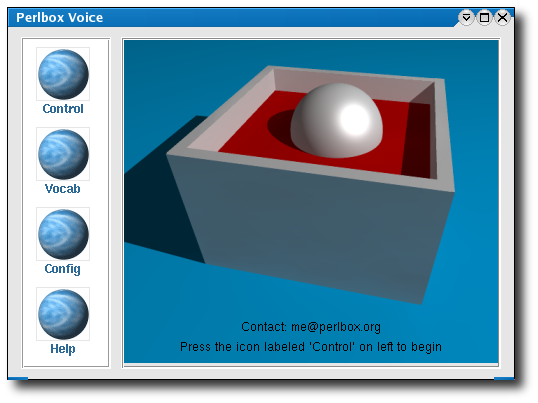
PerlboxToday, in the Linux page you find a post about two different speech recognition programs: Perlbox and CMUSphinx. We think that these voice enabled applications could be useful if you want to fast the way you use your desktop. We tested them in English and the results were pretty good. We suggest you to try them even if you haven’t any specific needs to use them. At least, you will spend some interesting hours testing the softwares our sons will use in next generation computers.

Watch your DVDs in the PSP using AutoGK and 3GP Converter!

PSPToday, in our freeware page, we have posted some lines about converting DVD in PSP videos. The freeware conversion method we described is one of the easiest you can use (if not, please, let us know your favourite method). Anyway, after the installation of two strong freewares, AutoGK and 3GP Converter (both very simple and easy to use) you can watch the DVDs you bought on the PSP. The first time, you have to install and correctly configure these freewares (more or less you spend 30-40 minutes) but after that, all the conversion sessions will not be too long (if you are not a video quality “puritan”). Last but not least… be connected with us during the Christmas period… we are planning to post a special review for USB portable software (more precisely, freeware). Thanks to you all! AddThis

How to create a tar (or gz, bz2, tar.gz, tar.bz2, zip, lha, arj, zoo, rar) file in Linux.

Thank you to Yietzel who posted a comment asking us some information about how to create a tar file. In the Linux page we created a short but effective post about this topic. This short manual (yes it is a manual because we included also the instructions to create: gz, bz2, tar.gz, tar.bz2, zip, lha, arj, zoo, rar files) is short but very clear and easy to use. We really hope you find our post useful. Please, let us know! AddThis

Wipzy, the Turbolinux alternative to Ipod.

WipzyThis week some French sites announced the launch of a new Ipod concurrent: Wipzy. This new Mp3 reader has a preloaded Turbolinux OS and plays mp3, ogg, aac, divx and jpeg files. Wipzy, if connected with a computer, could be a bootable linux OS (Turbolinux) with Firefox, Thunderbird, Voip and Skype. The weigth is 60 grams and the player will have a 4 gb flash memory. At the moment the estimated price is USD 250.00 and, in February, it will tested in the Japanese market before being selled in Europe and USA. If these information are correct, perhaps, in the next years, ipod will have a more frightening competitor than Zune.