Category Archives: linux problem

How to convert pdf to html on Ubuntu 9.04

This week, in our Linux Page (in Spanish), we tried to find how to freely convert pdf to html files. Unfortunately we have not been able to discover a satisfying solution. In fact, first of all (1) we upload our complex pdf file (text, color drawing and pictures) on Gmail email and we sent it to ourself. When we opened the email we click on “view as html” option and we were able to read the text (unfortunately too tiny) without drawings and pictures. It was not bad but we were really far from what we were looking for. As second experiment (2) we tried to use Kword and we had (as html) text and pictures but there were many incongruences between the texts and the borders and we missed some phrases. In few words, we had a better look but a worse result. Then (3) we installed pdftohtml using Synaptic Package Manager but unfortunately we were not satisfied from the html file we obtained. At this point we concentrated our researches on a free online solution and in order we tried: “Online conversion tools for Adobe PDF documents“, “convertpdftohtml“, “pdftextonline“, and “pdf-search-engine” but the results were not good. Unfortunately, we dismissed and I confess we could not find a solution to solve the task but we think that the “Kword solution”, if improved, is not far from a good solution in converting the file from pdf to html.  Please, if you have suggestions about this topic, feel free to add a comment. Thank you. AddThis mp3 link

Linux on Laptops!

This week, in our Linux Page (in Spanish) we added a brief post about www.linux-on-laptops.com: a very useful website where you can find tons of useful information about the best Linux version for your laptop. Linux-on-laptops is graphically very poor but the information it contains are terrific; in fact you just select your laptop brand and in a new webpage you are able to find all the laptop models related to that specific brand. With a couple of clicks you select your favourite Linux OS and you are redirect to external webpages and blogs where you receive all the necessary information to quick install that specific Linux version on your laptop. In a week time we made many tests and we found all the infos we were looking for. Moreover, linux-on-laptops is really updated with the most recent laptop models and Linux versions. Recommended! AddThis mp3 link

How to install the WI-FI Realtek RTL8187SE drivers on Ubuntu 8.10 – Intrepid Ibex

Today, in our Linux Page (in Spanish) we have added a brief post to install the Realtek RTL8187SE WI-FI card on Ubuntu 8.10. Surfing Internet we found different possible solutions and well done manuals to solve our problem but at the end we decided to select only the most effective. In particular we would like to focus your attention on the third discovered link http://boskastrona.ovh.org/download_en.html which contains the most effective solution we have tested. Useful! AddThis mp3 link

Clonezilla-SysRescCD 1.3.0: the best free rescue and backup/restore system for ext2, ext3, reiserfs, xfs, jfs, fat and ntfs!

Clonezilla-SysRescCDClonezilla-SysRescCD is something we have been looking for since months. In our Linux Page (in Spanish) we have posted a brief (full of links) review about this rescue Cd in its 1.3.0 version. Clonezilla-SysRescCD is a very interesting merge (multi boot CD) between Clonezilla and SystemRescueCD which allows you to solve many (better quite all, for what we read) “disasters”; that can be made by everyday pc users like us. Just to sum up the features contained in Clonezilla-SysRescCD we add some brief notes about the two different “parts”; contained in it. Clonezilla is a fast and reliable OpenSource clone system (OCS) which supports ext2, ext3, reiserfs, xfs, jfs, fat and ntfs partitions. On the other hand SystemRescueCD, based on a bootable Linux OS, allows you to repair your system and/or recover your data after a crash. We simulated some “disasters”; on an old Pentium4 (running Windows XP) and the results we obtained were substantially very positive. AddThis mp3 link

Hardinfo: simple, efficient hardware and system profiler for Linux.

Linux PageToday, in our Linux Page (in Spanish) we have posted a brief but effective review about Hardinfo: the best system and OS profiler we have never found for Linux. Hardinfo is a very useful program specifically created to deeply scan your hardware and create reports in HTML or in plain text formats. We suggest to use this software before upgrading your pc or when you suspect something is wrong with your hardware. Moreover, Hardinfo let you to easily benchmark your pc performance with just a click. Last but not least, you can download the source code or, if you prefer the autopackage file (suggested) which will automatically install the program in your computer. AddThis

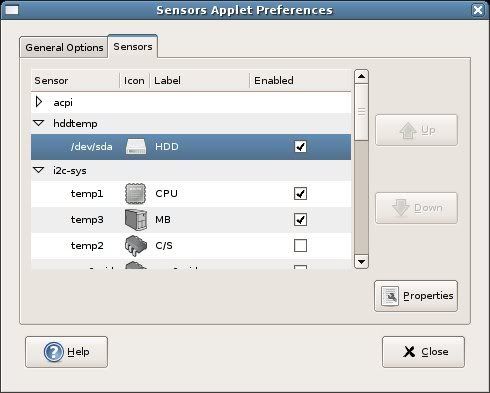
Gnome Sensors Applet (GSA): a -must have- applet for your hardware security in Gnome OS!

Gnome Sensors AppletToday, in our Linux Page (in Spanish) we strongly suggest a very useful applet for every Gnome OS: GSA. The Gnome Sensors Applet let you constantly check the hardware sensors, including CPU temperature, fan speeds and voltage. GSA is very easy to install and manage; its intuitive graphical interface allow you to decide what alarms you prefer to display in case of emergency. GSA is recommended for all the Linux users who constantly push the limits of their pc. AddThis

BUM (Boot-UP Manager): the boot configuration utility for Ubuntu

Boot-Up ManagerToday, in our Linux page we post a review about BUM a powerful, graphic Boot-up Manager for Ubuntu. Using this light software you can modify and decide what programs run at startup. BUM is a very useful tool, precious especially when you notice that your Ubuntu boot is becoming slower than in the past. Initializing the Boot-up Manager is very simple and fast: recommended for the Linux beginners (like us)! AddThis

How to solve upgrade problems in Ubuntu: some brief notes.

UbuntuYesterday a new version of Ubuntu (Feisty Fawn 7.04) has been released. This new version seems to be more powerful and enjoyable than the 6.10 and we hope it will actively contribute to spread the use of Linux. For people using Ubuntu 6.10, Ubuntu released simple and brief instructions to upgrade fast the OS.
In our Linux Page, we posted a brief tutorial about solving problems generated by an Ubuntu upgrade (this kind of problems is not common but unfortunately sometimes it happens..). The post, inspired some Italian blogs we found on the web, is very simple and effective and we hope it could be useful… in case of emergency. See you soon!

Envy: a fast way to install ATI and NVIDIA drivers in Ubuntu

nvidia logoToday, in our Linux page, Frank posted a brief comment about Envy: a good Phyton program which can easily help new Linux users to install ATI and NVIDIA drivers on Ubuntu. Before writing this post we tried ATI logoEnvy in our Ubuntu 6.10 and in less than 10 minutes we were able to use our new video card. In few words, for beginner Linux users like us, Envy is one of the most useful applications we can find.

An alternative and more effective way to kill a locked program in Kubuntu: using the PID

We use Linux because the possibility of crashes is lower than in other OS but sometimes some programs decide to lock themselves causing different problems to our PC usability.. When it happens we usually decide to use ksysguard but it doesn’t end our program. Today, in our Linux Page we have added a post about another way to solve these kind of matters using the PID. The post is short but we think it could be very useful for many Linux users. In fact, using the PID to kill a program is less time waster than restart the pc. See you soon and thanks for your comments! AddThis