by Christina Christian via Tech.co
Why a Centralized Work Hub Matters at Big Events Like Startup Week by Christina Christian via Tech.co
Leave a reply

by Christina Christian via Tech.co
Big Data & Cyberlaw- A Basic Primer Big data is a term that we are increasingly hearing these days. In fact, big data has already started impacting the mainstream operations of our daily lives, without us even realising the same. Companies and legal entities are increasingly relying upon big data, not just for the purposes […]
via Big Data & Cyberlaw- A Basic Primer — Cyber law books by Pavan Duggal
Quora? Are you sure about what you are saying? Why?
Yes, I am more than sure. I know that you could be surprised about thinking Quora as a Social Marketing tool but it is really a powerful if you learn how to disrupt its potential.
In few words Quora is you personal brainstorming tool. A real powerful tool if you consider that people in Quora are in the main part experts into their sectors.
If you post a question, promote it -asking to Quora suggested experts to answer- and you don’t receive any reply, it means you posted the wrong question! Quora people don’t waste their time answering to obvious or silly questions. So, if this happens, don’t be ashamed but remove it and start thinking what is the mistake you did. In many cases if you spend some minutes thinking about it you will find the answer you were asking for.
But, remember, don’t limit yourself to only asking but start answering the question that Quora will propose to you. Good answers will get you being noticed. And it could be helpful for your CV or for attracting traffic top your social media or blog.
For this reason I suggest you to spend the right time to write your profile when you join Quora. It is important for a couple of aspects. The first is related to the questions that Quora will propose to you: especially at the beginning they will be strictly related to your Bio. The second aspect is directly linked to your social exposure. Don’t forget that Quora is not only a collaborative platform but it is also a precious, “shining” window were you can directly show your expertise and indirectly attract new follower to your social media, blogs or online activities.

Quora is the right tool to create and nurture your personal branding strategy. If you think to be an expert on some topics, go to Quora and show your knowledge there. Because Quora is the best place to find people that are looking for the right answers to their top engaging questions.
Moreover Quora let you connect with experts in all the topics you prefer. Doing this you are able to create your personal web of experts and potential promoters for you or your activity. After a while, I suggest you to actively search the most appropriate questions you like to answers. This strategy will enhance your presence on Quora and allows you to give your best when answering.
Last but not least, don’t be obvious when you answer to a specific question directly related to your business or activity. If you want to promote your activity or your website you need to clearly explain why you think that it is the best solution to that specific question. In few words you have necessarily demonstrate to the questioner (and to all the other experts who are going to read you) why you or your services or website are the first best for his/her needs.
To conclude let me say that Quora is really essential for your Social Media Marketing and you should be really interested to test and include it into your Social Media Strategy!
Also if you use OpenDNS to improve your standard of privacy, you are not protected by “last mile” dangers but you can boost your security installing DNScrypt on your digital device. DNScrypt “works by encrypting all DNS traffic between the user and OpenDNS, preventing any spying, spoofing or man-in-the-middle attacks”.
DNScrypt “is a protocol that authenticates communications between a DNS client and a DNS resolver” and it “is not a replacement for a VPN, as it only authenticates DNS traffic, and doesn’t prevent “DNS leaks”, or third-party DNS resolvers from logging your activity”.
For this reason you have to be conscious that DNScrpt is just a -very good- improvement of your privacy but not the definitive solution to all your privacy concerns.
DNScrypt is so versatile that you can install it on every kind of device you prefer. In fact it is possible to download DNScrypt for servers, IOS, OSX, Android, Windows and Linux computers (DNScrypt-proxy version). Obviously the installation and setup will vary a little depending the OS you installed on your device.

Image from softpedia.com
Here we are talking about DNScrypt installation on Ubuntu.
For this purpose I suggest to use the Terminal that allows you to install DNScrypt i just 3 steps:
sudo add-apt-repository ppa:anton+/dnscrypt
sudo apt-get update
sudo apt-get install dnscrypt-proxy
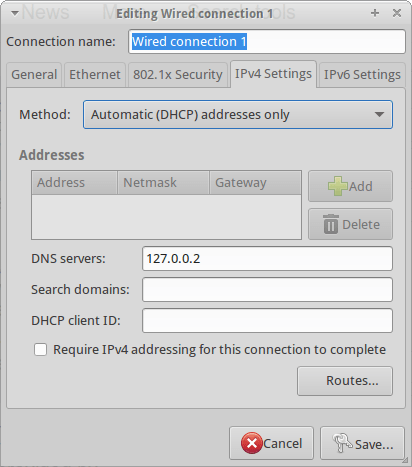
Last but not least, you need to interface the Internet traffic of your computer through the DNScrypt-proxy. For this reason you have to Edit your Network Configuration and add the address 127.0.0.2 to the “DNS Servers” line as for the below screenshot:
Now you can start DNScrypt just typing:
sudo dnscrypt-proxy -R opendns -a 127.0.0.2:53 -u okturtles
Where, in my specific case, okturtles is the name of the remote DNS resolver I decided to use. I chose that specific risolver from the list I found into into my computer after DNScrypt-proxy installation:
/usr/share/dnscrypt-proxy/dnscrypt-resolvers.csv
As usual in similar situations, you may want to spend another couple of minutes to configure your computer to start DNScrypt at the computer boot. Open the Session and Startup manager through the desktop Dash and Add this specific command to the Application Autostart menu:
sudo dnscrypt-proxy -R opendns -a 127.0.0.2:53 -u dnscrypt
After I registered the course I was not able to access it because “my browser didn’t allow the web storage” and, for this reason, a message informed me that it would be necessary to use a up-to-date browser as Chrome or Firefox.
The only problem is that I always use Firefox. Obviously a “particular” version of Firefox where I also added a bunch of different add-ons to enhance the privacy protection level of my navigation and, for this reason, the Google course was not available for me.
Normally I would have decided to quit the course because I prefer not to modify my Firefox configuration after I spent so much time searching the best add-ons to preserve a minimum of privacy. But, in this case, I really wanted to attend the course and so I decided to manually operate on the Firefox configuration to “solve” the problem and allow Google to keep all the information it would have considered as essential.
This is the list of what I did:
– open Firefox and type:
about:config
in the address bar.
– search for:
dom.storage.enabled
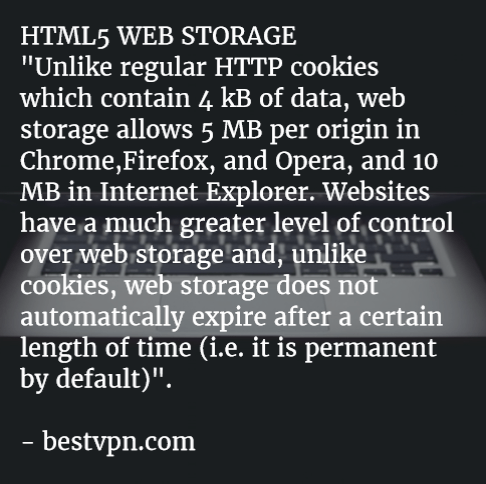

Image from: oriental-press.com
sudo nano /etc/ddclient.conf
sudo /etc/init.d/ddclient status

What’s better than testing? For me nothing!
For this reason, let me introduce some “unusual” Linux distribution proposed by Jesse Afolabi @Jesseflb via Techmint.
VeltOS and PapyrOS are based on Arch but the last one is in its pre-alpha testing so it’s not suggested for beginners.
Moreover, we may decide to begin 2016 with Korora that is still one of my favorite projects also after so many years since the first release.
Last but not least, we have Solus OS 2 that it is not the most Linux distribution I tested but it is stable and really well built.
Happy 2016!

Image from infoworld.com
If you need to share a confidential file to one of your colleague and you have not enough time to manually encrypt the file before uploading it to a you may consider to use securesha.re.
This online service let you to share a file through its online service encrypting it before it is uploaded to the securesha.re servers.
DevStash.io uses a 128-bit client-side AES encryption through a SSL protocol. This website automatically offers a 40 charaters long, randomly generated password that can be changed by user if he/she prefers to use its own passphrase.
Moreover securesha.re keep the file reachable in a long, random URL to decrease that files could be discovered through a brute force search.
Last but not least, this website let you delete the uploaded file after a pre-defined amount of time or/and after a pre-defined number of views. The default configuration allows just one view and an automatic deleting after seven days but the views can be extended till 10 and the amount of days reduced to just 1 day.
Personally I normally prefer to encrypt files by myself before sharing them online but I will keep securesha.re in mind in the case I need to share a file and I have not my laptop with me.